

DialShree New Version Released- Upgrade to Excellence!

Here's something we've learned after years of building contact center software: the best updates aren't the ones with the longest feature lists. They're the ones that solve real problems you've been dealing with every single day.
That's exactly what Dialshree v3.0.2 is about. We've been listening to your feedback, watching how you use the platform, and figuring out where things could be smoother, faster, and more secure. Today, we're rolling out seven updates that we think you're going to find pretty useful.
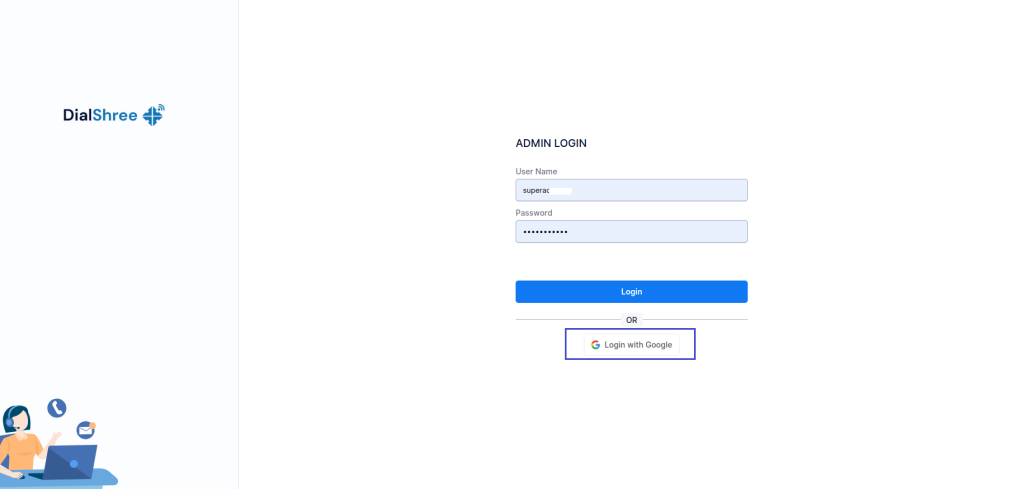
1.SSO with Google (Available for Both Agent and Admin Portals)
Let's start with something that honestly should have been here from day one – Google Sign-In for both agent and admin portals.
If you're like most people, you've got about fifty different passwords floating around in your head (or more realistically, saved in your browser and occasionally forgotten at the worst possible moment). We've added Google authentication, which means one less password to remember and a whole lot less time spent on password resets.
Features
- Seamless Login: Your agents and admins can sign in directly using their Google account credentials. No separate passwords to manage.
- Admin Control: There's a dynamic toggle in the user group settings that lets you enable or disable this feature anytime you want.
- Secure Access: Requires a valid registered email for successful authentication, so you know exactly who's logging in.
- Easy Configuration: Quick setup using Google API credentials and callback URL for both admin and agent portals.
Benefits
Your agents spend enough mental energy actually helping customers. They shouldn't have to waste any of it remembering which variation of their password they used for Dialshree. Enhanced security, familiar login experience, faster access, and you get flexible control without technical complexity.
Note: Currently available for on-premise server deployments.
2. External Transfer Sequential Call
Here's a scenario that's probably happened to you more times than you'd like: customer calls in, all your agents are busy or unavailable, calls get missed, customer gets frustrated, and now you've got a bigger problem than whatever they originally called about.
The External Transfer Sequential Call Mechanism fixes that.
Features
- External Transfer Switch: A simple toggle in the In Group settings to enable or disable external call transfers as needed.
- Single Transfer Mode: Route dropped calls directly to one predefined external mobile number configured for the In group.
- Multiple Transfer Mode: Route calls sequentially to a group of external mobile numbers until someone answers.
- Sequential Routing Logic: Automatically tries the next number in the group if the first one doesn't answer, continuing until a call is answered or the list ends.
- Fallback Handling: If nobody in the group answers, the call routes to voicemail or a default system message.
Benefits
Every missed call is potentially a lost customer. This ensures that doesn't happen, even when your office is having one of those days. No customer call gets left unattended, first-call resolution improves, customer frustration drops, and you get flexibility with both single-agent transfers and group-based sequential routing.
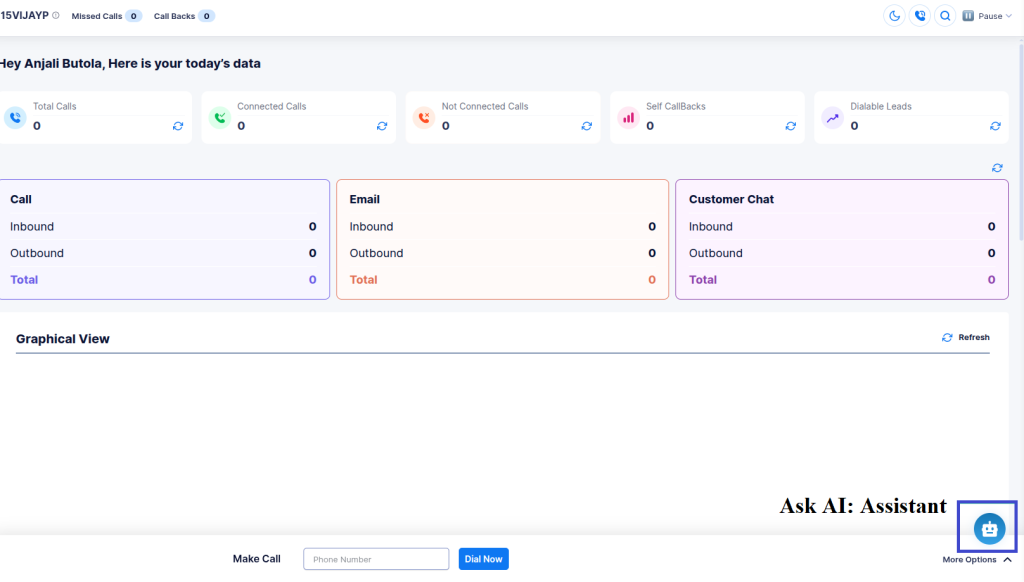
3. Ask AI in Agent Panel
We added Ask AI to the admin panel a while back, and the response was so positive that we knew agents needed it too. Now it's here in the Agent Panel.
Features
- Simple to Use: Just type your question related to configuration or platform usage.
- Step-by-Step Guidance: The AI responds with clear, tailored instructions for your specific query.
- Visual Support: Relevant screenshots and visual references are included for better understanding.
- Instant Content Redirection: The AI assistant redirects you to the appropriate documentation for detailed reference when needed.
Benefits
Your agents shouldn't have to interrupt their workflow to hunt down answers or wait for admin support for basic questions. This makes them more self-sufficient, resolves queries quickly, reduces dependency on admin support, improves productivity with guided visual instructions, and provides fast access to detailed documentation.
4. Multi-Factor Authentication (MFA)
Passwords alone aren't enough anymore. We all know this. But adding security shouldn't mean making everything harder to use.
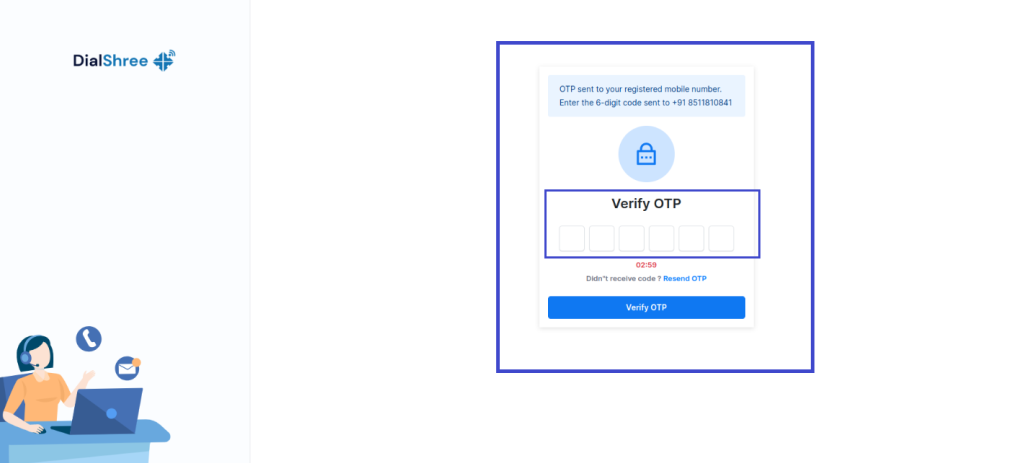
Multi-Factor Authentication adds a second verification step to your login process. After entering username and password, users get a One-Time Password via Email, SMS, or WhatsApp.
Features
- Flexible Control: MFA can be turned on or off for different user groups based on your security needs.
- Multiple Delivery Options: OTP can be received via Email, SMS, or WhatsApp – whatever works best for your team.
- Validation Requirements: Users must have a valid email or mobile number to receive OTP.
- Detailed Logging: OTP logs are available in the MFA report for administrators to monitor and troubleshoot.
- Resend Option: Users can resend OTP if they don't receive it the first time.
Benefits
Simple, effective, and it keeps unauthorized users out. Adds an extra layer of login security, protects accounts from unauthorized access, ensures only valid users can access the system, and helps admins track and resolve OTP delivery issues.
5. Work From Home (WFH)
The world's changed. Remote work isn't a temporary thing anymore – it's how a lot of teams operate permanently. The Work From Home feature makes that seamless.
Agents can work remotely using their personal devices. Calls automatically route to the phone number mapped in their profile, so there's no complicated setup required. No VPNs to configure. No softphones to troubleshoot.
Features
- Remote Agent Login: Agents can log in using their personal devices from anywhere.
- Automatic Call Routing: Calls route to the external phone number mapped for each agent in their profile.
- Admin-Level Control: Full control through Plan Management and User configurations.
- SIP User Restriction: Ensures secure and authorized remote access.
- Simple Configuration: No VPNs or softphones needed – just straightforward phone configuration.
Benefits
Enables flexible and productive remote working, ensures uninterrupted call handling from any location, provides secure and controlled access for remote agents, reduces dependency on office infrastructure, and streamlines administrative control and monitoring for managers.
6. SMS Broadcasting
Sometimes you need to get a message out to hundreds or thousands of people at once. The new SMS Broadcasting feature makes that simple.
Send bulk SMS messages directly from the Dialshree platform – notifications, promotions, reminders, alerts, whatever your business needs to communicate quickly.
Features
- Bulk SMS Campaigns: Send messages to multiple leads simultaneously.
- Customizable Templates: Create and manage reusable SMS templates for consistent messaging.
- Targeted Messaging: Filter recipients by lists, campaigns, or custom criteria.
- Real-Time Delivery Reports: Track delivery status and success rates for each campaign.
- Scheduling Support: Schedule SMS broadcasts for future dates and times.
- Seamless Integration: Works with your existing contact lists and lead data in Dialshree.
Benefits
Fast, cost-effective communication with large audiences. Increases customer engagement through timely alerts and updates, saves time by automating recurring announcements and reminders, provides clear insights into delivery performance and campaign effectiveness, and enhances marketing efforts with personalized SMS outreach.
7. Skill-Based Routing
Not all agents can handle all types of calls. Some specialize in technical support. Others are better at sales. Some are experts in specific products or services.
Skill-Based Routing ensures calls automatically go to agents with the appropriate skills, improving both efficiency and customer satisfaction.
Features
- Skill-Based Toggles: Enable at User Group and Campaign levels – both toggles must be active for the functionality to work.
- Auto Call & Dial Next: Calls are automatically routed when the Vendor Lead Code matches the selected in-group.
- Fallback Logic: Normal dialing logic applies when skill-based routing is disabled.
Benefits
Routes calls to the most suitable agents, reduces unnecessary call transfers, improves customer experience, and optimizes agent productivity and lead handling.
👉Bonus: Google Sheets Integration for Post-Call Data
Here's one more thing for the data nerds out there (and honestly, who isn't a data nerd when it comes to call center analytics?).
You can now send post-call data from your Laravel applications directly into Google Sheets in real time.
Key Highlights
- Real-Time Data Transfer: Lead information is instantly sent to Google Sheets as soon as the call ends.
- Dynamic Column Creation: New columns automatically appear whenever new data fields are added – no manual updates needed.
- Easy API Integration: Uses Google Apps Script Web App as a REST API endpoint for seamless connection.
- User-Friendly Configuration: Quick deployment with minimal setup; works with any Google Sheet and sheet tab.
- Error Handling & Feedback: Returns success or error messages in JSON format for easy debugging.
What We've Enhanced: Making Good Things Even Better
Sometimes the best updates aren't about adding new features – they're about making existing ones work better. Here's what we've improved in v3.0.2:
👉Lead Recycle: Day-Wise Configuration
We've enhanced the Lead Recycle feature to give you way more flexibility. You can now configure maximum lead attempts on a day-by-day basis instead of having one blanket rule for everything.
Key Features:
- Configure lead recycling attempts dynamically for each day
- Select the start date for lead reset from a calendar
- Automatic script runs at the start of each day to adjust attempts
- Admin-side logging with date-wise tracking
- Fully integrated within Campaign → Lead Recycle module
Benefits: Better lead management efficiency, campaign-specific flexibility, detailed audit trails, and optimized agent productivity by reducing redundant attempts.
👉WhatsApp Sticky Chat: Campaign-Wise Intelligence
Enhanced WhatsApp sticky chat to work across multiple groups while maintaining stickiness within the same campaign. No more cross-campaign confusion.
Features:
- Supports sticky reassignment within the same campaign when agents are unavailable
- Chats assigned to one campaign stay invisible in other campaigns
- Maintains existing sticky logic when enabled at user or campaign level
Benefits: Improved assignment accuracy, proper agent stickiness while respecting campaign boundaries, prevents cross-campaign visibility, seamless agent experience.
👉TTS Module: Dynamic & Static Audio Templates
Text-to-Speech just got a lot more powerful. Create templates that combine uploaded audio files with dynamically generated speech using placeholders like first_name or lead.
Key Features:
- Static Mode for simple, predefined text conversion
- Dynamic Mode to mix text and audio files with dynamic placeholders
- Convert text to WAV audio format
- Preview full sequences before saving
Benefits: Personalized audio messages, seamless mixing of static and dynamic content, correct sequence playback, simplified template creation and testing.
👉Campaign Recording Filename: Permission-Based Editing
The Campaign Recording Filename field now respects user group permissions. Restricted groups see it as read-only, while others can edit freely. Plus, we've increased the maximum length to 100 characters.
Impact: Appropriate access control and support for longer, more descriptive filenames.
👉External CRM Access: Off-Call Availability
Previously, agents could only access External CRM after initiating a call. Now they can access it directly from the Agent Panel anytime.
Features:
- Admins enable this via User Group settings
- Configurable External CRM URL per user group
- No need to start a call first
Benefits: Improved workflow efficiency and quicker CRM data access.
👉Owner Only Dialing: Lead Count Display
The agent dashboard now shows the count of leads owned by the logged-in user when Owner Only Dialing is set to USER.
Note: Dial method must be set to MANUAL or INBOUND_MAN.

👉ALT Dispo Call URL: Multiple URLs for Inbound In-groups
Admins can now configure multiple Dispo Call URLs by entering ALT in the field. Add multiple URLs with execution order, descriptions, call status triggers, and enable/disable controls.
👉Audio Soundboard Module: Hierarchical Organization
Enhanced file management, layout consistency, and support for hierarchical audio files makes organizing sounds much easier.
Features & Enhancements:
- Default font auto-set
- Audio files sorted by rank
- Default layout auto-selected
- Level 1 records display type headers with highlighted space
- Horizontal file arrangement fixed
- Level 2 files can be added under parent files with hierarchical display
👉WhatsApp: Screenshot Copy/Paste + Drag/Drop
Agents can now quickly add images to WhatsApp messages by copy/paste or drag-and-drop. No more manual attachment hassles.
Features:
- Screenshot copy/paste directly into chats
- Drag images from local folders and drop into chat window
- Faster responses with reduced manual steps
👉Template Builder: Field-Level Validation for Lead Upload
Improved data quality with mandatory field validation during CSV uploads.
Features:
- Mark Standard and Custom Fields as Required during template creation
- Validation during upload against template requirements
- Records with missing mandatory fields moved to Error CSV with detailed messages
- Only validated records inserted into database
Benefits: Better data integrity and cleaner lead databases.
👉Owner-Based Dialling: Lead Details on Agent Panel
Agents now see only their assigned leads with full visibility and control.
Features:
- Owner Only Dialing for assigned leads only
- Personal lead count on dashboard
- Filter by Lead ID, Vendor Code, City, or State
- Detailed lead view with 🔍 icon
- Hidden leads for unassigned agents ensure data security
👉WhatsApp Log Report: Original Agent Tracking
Enhanced report tracking to preserve the first assigned agent even after multiple reassignments.
Features:
- Chat History shows last 25 messages for better context
- Original agent tracking with whatsapp_sticky_assignment_log
- Report User column shows original agent
- Outbound messages display correct sender
Benefits: Improved chat continuity, accurate tracking, clear audit trails.
👉Custom APR Report: Date Breakdown
More detailed insights with date-wise breakdowns while keeping on-screen summary unchanged.
Key Updates:
- Show Date Breakdown switch in report filter
- On-screen stats display collectively for selected range
- Download Date Breakdown option includes per-date stats for each user plus Total row
👉Custom Export Call Report: Survey Details & Per Call Notes
Two new filter options added:
- Survey Details: Include survey data when set to Yes
- Per Call Notes: Include call notes when set to Yes
Note: Selected data appears in both CSV and PDF downloads.
New Reports That Give You Better Insights
👉Screen Sharing & Video Recording Report
Screen Sharing Report:
- Complete log of all screen sharing sessions
- Filter by date range, agent, and criteria
- Detailed session information on index page
- Monitor agent activity and compliance
Video Call Log Report:
- Detailed logs of all video call sessions
- Playback recorded calls directly from report
- Filter by date, agent, or parameters
- Track performance and quality monitoring
👉External Transfer Call Report
Comprehensive view of all externally transferred calls with filtering by date, agent, campaign, or transfer destination.
Features:
- Centralized view of all external transfers
- Apply filters for targeted analysis
- Access call details including time, duration, agent info, destination
- Export data for record-keeping
Ticketing Enhancements: Smarter, Faster, More Connected
👉Direct Messaging: WhatsApp & Email in On-Call
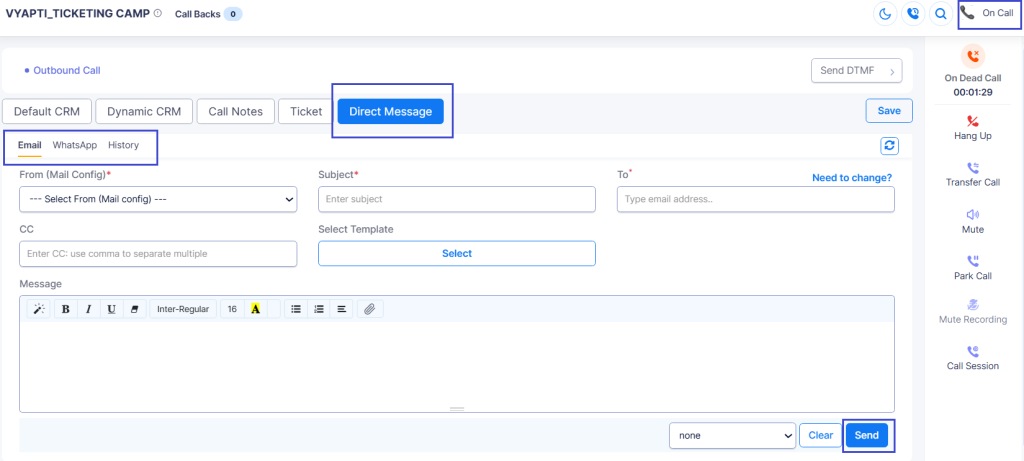
Agent Direct allows quick messages to customers during calls without creating tickets.
Key Features:
- Direct Message button in On-Call modal with WhatsApp, Email, and History tabs
- Template-based messaging with dynamic variables
- History tab shows all sent messages
- Admin report to view and export agent messages
Benefits: Fast communication without ticket overhead, organized template-based messaging, transparent history, admin-level visibility.
Access: Requires Send Direct Message permission.
👉Sticky Agent Assignment
Automatically assigns new tickets to the same agent who previously handled that customer's tickets within a specified look-back duration.
Supported Channels: Call, Email, WhatsApp, Web, Instagram, Facebook
Key Points:
- Requires Auto Assignment mode enabled
- Configurable Look Back Duration
- Agent selection when multiple agents previously handled customer
- Falls back to standard auto-assignment if no match found
Benefit: More personalized, seamless support by routing customers to familiar agents.
👉Skill-Based Ticket Assignment
Tickets from all channels automatically route to the most suitable agent based on skills and expertise.
Key Highlights:
- Automatically assigns based on required skill (e.g., language proficiency)
- Define skills and parameters in Admin Panel
- Assign ranks for skill prioritization
- Integrates with Auto Response templates to detect preferences
- Works across all channels with fallback rules
- Assigns only to active agents (logged in within last 5 minutes)
Benefits: Reduces misrouting, improves resolution speed, enhances customer satisfaction.
Getting Started with v3.0.2
For Existing Users: The update is rolling out now. Most features are available immediately through your admin panel settings. Check your notifications for any specific configuration steps for your deployment.
For New Users: If you've been considering Dialshree, now's a great time to start. These updates represent some of our most requested features, and they're all included in the latest version.
What's Next
We're not slowing down. Your feedback shapes our roadmap, and we've got more improvements in the pipeline. Keep telling us what would make Dialshree work better for your team – we're listening.
Conclusion
Dialshree v3.0.2 isn't about flashy features that look good in demos but don't hold up in real-world use. It's about solving the actual problems you face every day – security, efficiency, remote work, customer experience, and making your agents' lives easier.
That's what good software updates should do. Make things better without making things harder.
Questions about any of these features? Need help with configuration? Our support team is ready to help.
Welcome to Dialshree v3.0.2. We think you're going to like what we've built.
#Dialshree #ContactCenter #SoftwareUpdate #CustomerExperience #RemoteWork #CloudCommunication #CallCenter #TechUpdate #ElisionTechnologies