

DialShree v3.2.0: What’s New, and What It Means
Sometime business don’t lose customers because of one big failure. They lose them in small gaps: a lead dialled while the agent is away, a callback nobody remembered, a customer number visible on the wrong screen, a social comment that never became a ticket.
DialShree v3.2.0 closes a lot of those gaps. This release brings IP-based access control, wider number masking, an agent-first flow for work-from-home calling, callbacks that dial themselves, ElevenLabs voices in the TTS module, and new SMS, Instagram and Facebook channels in Ticketing, along with WhatsApp Calling. It also adds new reports, new APIs and a long list of everyday improvements.
Here is what’s new, and what it means for your floor.
v3.2.0 at a glance
- New: ElevenLabs TTS, Call Hangup Reason Report, IP-based access restriction, automatic callbacks, Disposition Excel Import and three new APIs
- Calling: WFH agent-first call flow, Callback Min and Max Time, WebRTC validation before login
- Data protection: 5-digit masking across reports and recordings, Collection Module masking, read-only field masking
- Ticketing: SMS, Instagram and Facebook channels, WhatsApp Calling and two new reports
Running the Collection Module? Look at Phone Number Masking for Default CRM Fields, Custom Fields Type (Readonly) masking and Callback Min Time and Max Time.
New Modules and Features
ElevenLabs TTS Integration
ElevenLabs is now available in the TTS module alongside GTTS, ATTS and ITTS. Choose an available ElevenLabs voice, enter your text and generate audio with the Multilingual v2 model, which is the default. The audio plays in a new browser tab.
BENEFITMore voice choices for your prompts and campaigns.
Call Hangup Reason Report
See how every inbound and outbound call ended: by the Agent, the Caller, a Drop or None. Filter by call type, date range, in-group or campaign, hangup by, agent, phone number, list and call status. Each record shows duration, status, campaign, list, lead ID, hangup reason, phone number and agent. Export to CSV or PDF.
BENEFITClear visibility into who ended each call, in one report.
IP-Based Access Restriction for Admin Panel and API
Create IP Lists of approved addresses and assign them to user groups. Admin Panel logins and API requests are allowed only from those addresses, and anything else is blocked. Lists can be switched on or off at any time.
BENEFITPrevents unauthorized access to the Admin Panel and API.
Automatic Dialing for Agent-Only Scheduled Callbacks
Agent-only (USERONLY) callbacks now open the lead and dial automatically when they are due.
- Agent Ready or idle: the call starts right away.
- Agent on pause: it starts when the agent returns to Ready.
- Agent on a call: it waits until the call ends.
BENEFITNo manual step, so fewer missed callbacks.
Disposition Excel Import
Create many dispositions in one upload. Download the sample template, track progress in Import History, see the processed, successful and failed counts, and download a Failed Records Report with the reason for each failure.
BENEFITMuch faster than adding dispositions one by one.
Call Details API
Fetch call, lead, agent, disposition, recording and custom-form details straight from the dialer. Search by Vendor Lead Code, Phone Number, Lead ID, Unique ID or Inbound Call ID, including earlier dates where data is available. It is read-only and uses Bearer Token authentication.
BENEFITA reliable backup when a webhook is missing or incomplete.
New API: Agent-wise Pending Callback Statistics
Returns today’s pending, overdue, future and total pending callbacks for a User ID. Add a Campaign ID to limit it to one campaign, or leave it out to cover all of the user’s campaigns.
BENEFITShow each agent’s callback workload in your CRM or dashboard.
New API: Campaign Pause Codes ADD/UPDATE/DELETE
Add, update and delete campaign pause codes through APIs instead of editing the Campaign configuration.
BENEFITManage pause codes from external systems, with no manual edits.
Enhancements
IVR Audio File Name in Custom Export Call Report
A new column lists every IVR audio file played during a call, in the order played. It is captured automatically from your Survey/IVR campaign, with no extra setup.
BENEFITSee exactly what the customer heard.
Agent Panel Dashboard: Sales Count Display
Turn on Agent Display Sale Count under Campaign > Edit Campaign to show agents a live, auto-refreshing count of SALE dispositions for the active campaign.
BENEFITAgents track their sales without opening a report.
Missed Call Report: Dialed Multiple Times Column
A new column shows Yes when a number appears more than once in the filtered results, and No when it appears once.
BENEFITRepeat missed calls are easy to spot.
Multiple URLs for Dispo and No Agent Call URLs
Enter ALT in the Dispo Call URL or No Agent Call URL field to show a Multiple URLs button, then add URLs one by one. Set a Rank for the run order, and choose specific statuses or all statuses. Each URL runs independently, so one failure doesn’t stop the others.
BENEFITTrigger several workflows from one event.
Phone Number Masking for Default CRM Fields
With the Collection Module enabled, values that are only a number in Address 1, Address 2, Address 3, Alt No and Province are masked (first 5 digits) when leads are uploaded. Normal address text isn’t affected. It uses your existing Agent Hide Phone Data setting.
BENEFITCustomer numbers stay hidden from agents, even in address-type fields.
Custom Fields Type (Readonly): First 6 Character Masking
Read-only custom fields can show or hide only the first or last digits. The First 6 option shows the first six characters as XXXXXX and keeps the rest visible, for any value, not just phone numbers. Set it in List & Lead > List > Custom Fields > Add/Edit Custom Form Field.
BENEFITAgents see only the part of a value they need.
Default Display Last Value for Custom Fields
Choose, field by field, whether the last saved value shows when the form loads or the field opens blank. Saved data is kept either way.
BENEFITCall-specific fields like remarks start fresh, so old notes don’t carry over.
Campaign: Hopper Leads Data Download
Download hopper lead data as CSV or Excel from the Hopper Leads view. With no search you get all the data, and with a search you get only the matching records, in the same sort order.
BENEFITEasier analysis and offline records.
Computer IP in Agent Login/Logout Report
The report and its export now show the Computer IP for each agent login.
BENEFITEasier review of agent sessions.
WFH Calling: Agent-First Call Flow
BEFOREAgent and customer were called together. If the customer answered and the agent didn’t, the lead could be wasted.
NOWThe agent’s mobile rings first. The customer is dialled only after the agent answers.
This works for outbound calls started from the Agent Panel and the API.
BENEFITFewer wasted leads.
Campaign: Callback Min Time and Max Time
Two new Campaign fields set the earliest and latest time for scheduling callbacks, in both the Agent Panel and the Collection Module. Example: with a 10:00 AM to 6:00 PM range, a 9:00 AM or 7:00 PM callback is not allowed.
BENEFITCallbacks are booked only inside your campaign hours.
Recording Module: Filter, Sorting, and Masking Updates
- The Call Type filter adds an All option.
- The date filter accepts a specific date and time range.
- Recordings appear in date-wise order, whatever filters are applied.
- When 5-digit masking is enabled, the configured digits are also masked in the recording.
BENEFITEasier to find the right recording, with numbers protected.
5-Digit Number Masking Across Reports and Modules
Now supported in 19 reports: Call Details, Custom Export Call, Custom Real-Time Dashboard, ExportBroadcast, Export Call, Lead, Real-Time, Hangup Cause, DNC Log, WhatsApp Log, AMD Log, Callback, Missed Call, SMS Logs, Survey Campaign, SIP Event, Agent Feedback IVR, Carrier Log and IVR Flow. It also covers outbound call logs in User Stats and the Lead module.
BENEFITConsistent protection of customer numbers across DialShree.
DNC Download: Multiple Campaign Selection
Select multiple campaigns, or all of them, and download their DNC numbers in one action.
BENEFITNo more downloading campaign by campaign.
WebRTC Validation Before Agent Login
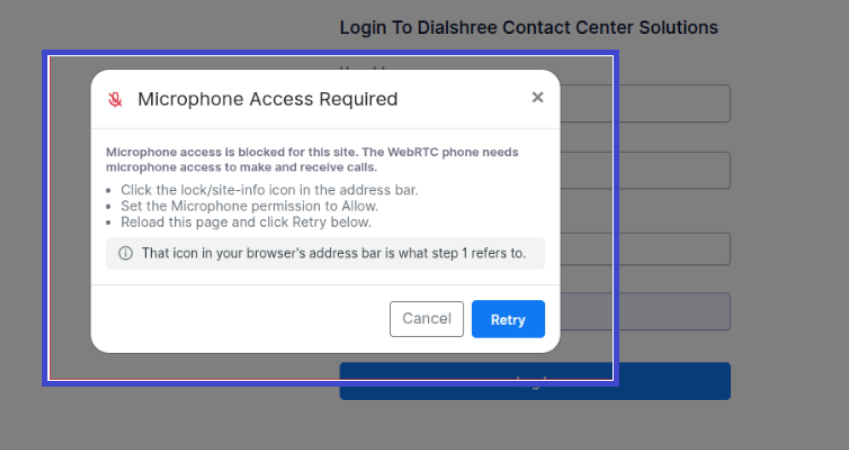
When Webphone is set to Y, DialShree checks microphone permission and availability and the browser’s WebRTC requirements before login, and shows an error if a check fails. When it is N, the checks are skipped.
BENEFITSetup problems are caught at login, not in the middle of a call.
Copy Custom Fields Shows Active Lists Only
When you create a new list, the Copy Custom Fields dropdown now shows only active lists. Inactive lists are hidden.
BENEFITNo chance of copying from an outdated list.
Show All Option for Campaigns, In-Groups, and DIDs
Only active Campaigns, In-Groups and DIDs show by default. Click Show All to see inactive ones as well.
BENEFITClean default lists, with inactive items one click away.
URL Log Report: User Group Access and Webhook Resend
Users see only the URL logs of their own User Group. Failed webhook records with a false response can be re-pushed directly from the report.
BENEFITThe right visibility for each team, and easy retries.
Agent Login/Logout Status in User Stats
User Stats now shows the reason for a logout, including a manual or emergency force logout and a closed browser.
BENEFITA clear reason behind each logout.
Real-Time Report: Waiting and Live Calls on the Same Page
Waiting Calls and Live Calls now appear together on one page.
BENEFITOne screen to monitor calls in the queue and calls in progress.
Usergroup Management for Client Admin Users
Client Admins can edit Usergroups, including permitted Campaigns and Usergroups, and create a new Usergroup by copying an existing one.
BENEFITSimpler setup and upkeep of Usergroups.
Timeclock End Of Day Support for Daily Statistics
Daily statistics now follow your configured Timeclock End Of Day instead of the calendar day. Example: with an end of day of 5:00 PM, “today” runs from 5:00 PM yesterday to 4:59:59 PM today.
BENEFITDaily numbers match your real business day.
Ticketing
Three new channels, WhatsApp Calling and two new reports.
SMS Ticketing
Incoming SMS messages create tickets, and agents reply from the ticket in a two-way conversation. Delivery status shows as Not Sent, Sent or Delivered, updated in real time through webhooks. SMS channels can be linked to departments to control who sees the tickets.
BENEFITCustomer text messages are handled as tickets, each with an owner and a delivery status.
Instagram DM & Comments Ticketing
DMs and comments that contain your configured keywords create tickets. Agents can reply publicly to a comment, or use Comment-to-DM to continue privately: the message joins an open DM ticket if one exists, otherwise a new DM ticket is created.
Agents can reply to specific messages, edit and delete messages, add reactions, assign and reassign tickets, set priority and status, and see customer information, SLA, internal comments, tags and custom fields. DM replies follow Instagram’s 7-day messaging window, and supported images and videos can be sent.
BENEFITInstagram DMs and comments are worked from one ticket, without switching apps.
Facebook DM & Comments Ticketing
Messenger DMs and Page comments that contain your configured keywords create tickets. Agents get the same tools as for Instagram: public replies, Comment-to-DM, message and ticket management, customer information, and image and video attachments. Messenger replies follow the 24-hour messaging window.
BENEFITFacebook DMs and Page comments are worked from one ticket, the same way as Instagram.
WhatsApp Calling in Ticketing
Agents can call customers from eligible WhatsApp tickets after the customer grants calling permission, and receive calls on the business WhatsApp number. They can answer, reject, mute, unmute and end calls. History shows Completed, Missed, Rejected and Busy, and calls can be recorded when the feature is enabled and supported.
BENEFITChat and voice happen in the same ticket, so the customer history stays together.
WhatsApp Calling Report
Shows Ticket ID, customer, agent, call direction, status, call time, duration and Call ID. Play, stop and download available recordings, and export to CSV or Excel. Admins see team-wide records, and agents see their own.
BENEFITClear tracking of WhatsApp call activity and outcomes.
Social Media Comments Report
Gathers comments from connected Facebook and Instagram channels in one view. It shows whether a ticket was created, the original post, and whether a private reply is available, sent or expired. Filter by date range, User Group, channel and ticket creation status, and download the data.
BENEFITOne place to monitor social comments and see which ones became tickets.
Get started with v3.2.0
Reference documents are available for the new APIs, phone number masking, read-only field masking and Default Display Last Value. To see v3.2.0 on your own campaigns, contact the Elision team.