Fraud Blocker

Break Language Barriers and Supercharge Engagement & CX with even more robust & powerful DialShree 2.0

Dialshree 2.0

Introduction

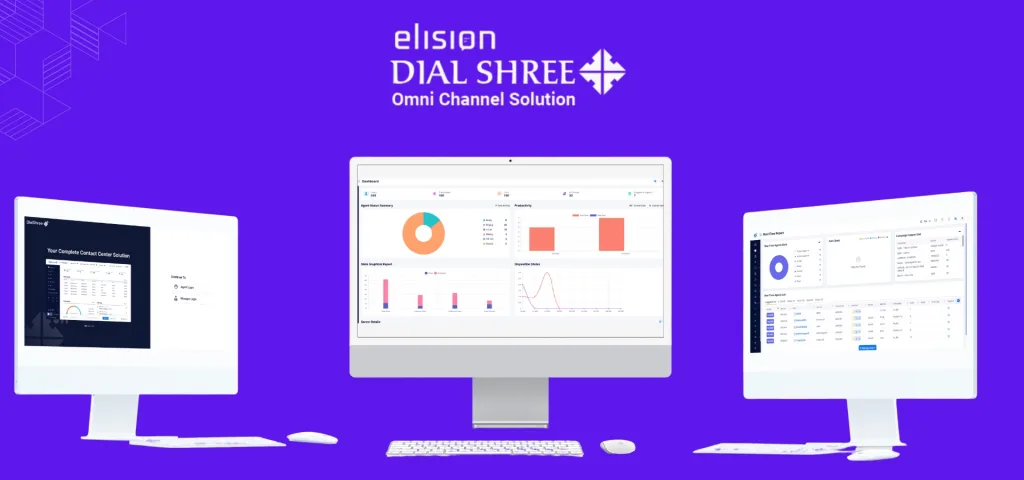
DialShree is an all-in-one omni-channel contact centre suite designed to help businesses efficiently manage their sales, customer service, and telemarketing operations. It provides a comprehensive suite of features to optimize inbound and outbound campaigns, enhance workforce productivity, and deliver exceptional customer experiences.

Built using Laravel, DialShree 2.0 is a new-age omnichannel contact center platform that combines robust functionality with the power and efficiency of Laravel’s framework. With its swift interface, seamless integration capabilities, and flexible customization options.

With on premise and cloud-based solution both the options, DialShree enables enterprises to manage their contact centre via an intuitive online interface accessible from any device. The software integrates seamlessly with existing business systems and can be customized to align with specific operational requirements. 

With its latest upgrade, DialShree introduces several enhancements across modules to further streamline contact centre processes. The new features & technical betterments empower businesses to boost agent productivity, expand customer reach, gain data-driven insights, and future-proof operations.

DialShree 2.0 incorporates full WebRTC support, leveraging this cutting-edge technology for seamless real-time communication. WebRTC eliminates the need for additional plugins or software installations, simplifying the process for agents and customers alike.

With DialShree’s WebRTC integration, agents and customers can engage in crystal-clear audio and high-definition video calls directly through web browsers.

Intuitive UI/UX – A Major Jump

The UI/ UX of a DialShree is a major boost, going to play a vital role in the effectiveness and efficiency of agents. The new version of Enhanced Security, Management, and Reporting is designed to provide a cutting-edge and intuitive UI/UX to enhance the agent experience. With over 20 years of core expertise, our UX team has developed an interface that minimizes the number of clicks required to navigate the system while ensuring quick and easy toggling between key features and tabs.

This intuitive design saves time and improves accuracy, resulting in more efficient and effective communication with customers. By focusing on UI/UX design, Enhanced Security, Management, and Graphical Dashboards can provide businesses with a powerful business communication platform for optimizing their contact centre platform capabilities and effectiveness.

Admin Enhancements

DialShree 2.0 empowers call centre admins with enhanced automation, customization, and access control capabilities to streamline operations. 

The new FTP configuration allows setting up of secure FTP or SFTP details for automated report generation and delivery. Authorized users can easily retrieve reports based on predefined parameters without any manual effort.

The plan management module enables creating customized plans aligned to specific business needs. Unique plans can be tailored with customized names, descriptions and categories to serve different customer segments. Individual modules can also be efficiently tracked and assigned within each plan for optimal utilization. 

Integration with user groups enables restricting access to certain fields and modules based on user roles. Sensitive information is protected by limiting functionality access to only relevant users. This prevents unauthorized access and improves overall security of the PII of customers.

With these upgrades, admins can automate repetitive tasks, customize plans for unique requirements and strengthen access control. This results in increased efficiency, better resource planning and an elevated customer experience.

Internal & External Chat:

Transform Customer Engagement with convenience and go-to channel.

Agent-Manager Collaboration:

Managers can initiate one-on-one chats with logged-in agents to provide guidance and support in real time. They can also send broadcast chats to all agents or specific groups, the manager chat capabilities facilitate seamless supervision, boosting productivity through enhanced collaboration.

Social Media Integration:

Leverage Popular Platforms to Expand Your Reach

With DialShree’s enhanced social media capabilities, businesses can now integrate with leading platforms like Facebook and Twitter to increase brand awareness and engage customers in new ways.  

Facebook Integration

The powerful Facebook integration allows you to:

– Configure Facebook API settings for deep integration capabilities 

– Display Facebook pages and content directly within DialShree

– Authenticate using Facebook accounts for secure and streamlined access

– Activate/deactivate integration as needed for optimal functionality

By harnessing Facebook’s unparalleled reach, businesses can share content, and facilitate customer conversations at scale. Drive more traffic to your website, promote special offers, and respond to comments and inquiries in real-time – all without leaving DialShree.

X (Previously Twitter) Integration

DialShree’s Twitter integration empowers you to:

– Configure Twitter API credentials for authorized access

– Seamlessly post tweets and interact with followers 

– Integrate Twitter messaging into customer conversations

– Connect multiple Twitter accounts for expanded reach

Businesses can now tap into Twitter’s massive active user base to increase awareness, share updates, and engage followers. The intuitive integration makes community interaction effortless. Send quick responses to customer tweets, share links, run Twitter-only campaigns, – Taking your Twitter engagement to the next level.

With these robust social capabilities, DialShree enables businesses to meet customers where they already are – on the social platforms they love. This expanded social media presence translates into improved brand visibility, deeper customer connections, and greater revenue potential.

Enhanced Call Features

DialShree’s enhanced call features provide greater visibility and control over your calling operations. The Missed Call Lists feature keeps a comprehensive record of all missed calls so you never miss an opportunity to engage with customers. Even the most valuable customer inquiries don’t get left unanswered, maximizing satisfaction and conversion rates. 

The Callback Date Time Notification feature allows you to stay organized and never miss important follow-ups. It provides automatic reminders/ pop ups about critical calls, enhancing the customer experience through timely communication. Streamline operations and optimize productivity with efficient call management.

The new Graphical Dashboard allows you to harness the power of data for informed business decisions. Gain valuable insights into user stats, real-time performance metrics, and detailed call data. Make data-driven decisions to optimize operations and the customer experience. Track key performance indicators and measure the success of your contact center activities.

With these enhanced features, you’ll never miss a chance to engage with customers, stay organized with follow-ups, and use data to guide your decisions. Deliver a seamless customer experience, experience enhanced productivity, and enjoy simplified usage.

Screen Sharing for Effective Collaboration

The upgraded DialShree contact centre solution now allows agents to share their screens with other agents or supervisors in real-time. This screen-sharing capability facilitates improved collaboration between agents by enabling them to visually show each other what is on their screens. So, they can collaborate and guide each other in almost no time.

Message Board to foster Two – way Communication

Introducing the new message board feature in DialShree for seamless agent-manager communication. Agents receive important updates and reminders directly on the noticeboard, improving information flow. Two-way communication allows agents to post questions and feedback, fostering transparency and collaboration. Elevate inter-team communication with DialShree’s centralized platform.

Screen Recording for Quality Assurance

With DialShree’s enhanced quality assurance capabilities, you can closely monitor agent interactions and optimize performance. The screen recording feature allows you to capture visual recordings of an agent’s screen during calls. This unprecedented visibility enables monitoring adherence to policies, as well as using recordings for training purposes. 

The custom APR report allows tailoring agent performance reports to your specific needs. You can filter and analyze data based on various parameters like campaigns and user groups. This helps continuously improve agent productivity and identify areas needing more training and development. 

The advanced telco utilization report allows tracking and analyzing PRI and SIP channel dynamics and activities in real-time. The insights help enhance resource planning and optimize telecommunications usage.
Dialshree 2.0

SMS/Messaging

Streamline and Enhance Customer Engagement with the New SMS/Messaging and WhatsApp Features

SMS/Messaging Module

Admin Level Features

  – Enable SMS functionality right from the Admin Panel

  – Configure SMS APIs, templates, and mappings for seamless integration

Agent Level Features:

  – Access the SMS module in the agent panel for efficient communication

  – Select and utilize pre-defined SMS templates for quick responses

  – Send personalized messages to leads, ensuring effective engagement

WhatsApp Module:

Admin Level Features:

  – Empower agents with the ability to use WhatsApp Web for convenient communication

  – Enable outbound WhatsApp messaging to reach a wider audience

  – Set up and configure WhatsApp APIs, templates, and mappings effortlessly

Agent Level Features

  – Seamlessly access the WhatsApp module within the agent panel

  – Effortlessly exchange text, documents, videos, images, and emojis with customers

  – Participate in group chats, facilitating collaboration and teamwork

  – Pin important contacts, forward messages, and track delivery status for actionable insights

  – Synchronize contacts with WhatsApp for streamlined customer management

  – Utilize predefined message templates to ensure consistent and efficient communication

  – Start WhatsApp chats instantly with new phone numbers, expanding outreach capabilities

Reporting

Automated Reporting

The upgraded DialShree contact center solution provides agents and managers with valuable insights in real-time. 

Reports can also be scheduled to run automatically regularly, eliminating the manual effort of pulling reports. This enables managers to efficiently monitor trends, identify issues, and make data-driven decisions to improve operations. Some key benefits include:

– Customizable dashboards with drag-and-drop widgets to track real-time KPIs.

– Ability to drill down into reports for details.

– Scheduled delivery of reports to specified recipients via email.

– Easy creation and modification of reports without IT help.

– Exporting reports to Excel, PDF and other formats.

– Comparing performance across time periods.

– Automation frees up manager time from manual reporting.

– Better visibility into contact centre performance 24/7.

Refreshable agent dashboard

to analyze the dashboard in real-time without any interruption.

Rather than waiting for scheduled reports, supervisors can check the dashboard at any time to see which agents are online, the number of calls handled, average handling time, and more.

The auto-refresh feature ensures the dashboard never gets stale throughout the day. 

Leaderboard for healthy competition

DialShree motivates agents through gamification. Agents can see where they rank compared to their peers on key performance metrics.

 The leaderboard displays the top-performing agents across criteria like:

 – Calls handled

– Average call time

– Customer satisfaction scores

– Sales conversions

The leaderboard fosters a culture of healthy competition among agents. Agents are driven to sharpen their skills so they can outperform their colleagues.

Inbound Service Level Report

Obtain vital metrics to analyze call performance and customer service levels. Comprehensive tables display shift data, hold times, drops, call duration, and statistics. Gain insights to optimize call handling, reduce wait times, and boost customer satisfaction.

Outbound Calling Report

Receive a detailed overview of outbound campaign performance. Sub-reports and columns provide insights into total calls, human answers, drops, no answers, hang-up reasons, and call statuses. Leverage data to optimize outbound campaigns, improve conversion rates, and drive success.

Additional Enhancements

DialShree’s latest release includes several additional enhancements to improve the agent and customer experience.

Multi-Language Support

DialShree now provides seamless multi-language support, allowing businesses to break language barriers and cater to diverse customer bases. The system can be configured to work in multiple languages, ensuring clear and effective communication for customers.

Agent Panel Light and Dark Modes

Agents can now switch between light and dark modes in their panel interface. This provides the flexibility to select the ideal mode for different lighting conditions, reducing eye strain and enhancing the agent experience.

Redial Call Based on Disposition

The redial feature integrates with the dispositions, so agents can tag calls for redials and the system will automatically dial back out at the scheduled time. This prevents dropped calls and improves continuity in ongoing customer relationships.

Overall, the advanced dispositions with redial capabilities empower agents to have more meaningful customer interactions while optimizing operations.

Time Limits for Pause Codes

DialShree now allows supervisors to set time limits for pause codes used by agents. Agents must select a reason when going into pause status, such as taking a scheduled break or attending a meeting. By setting limits on these pause codes, supervisors can better ensure adherence to break times and improve monitoring of overall agent productivity. 

Auto-Generated Campaign and List IDs

DialShree introduces auto-generated campaigns and list IDs for simplified tracking and organization. Uniquely identifying campaigns and lists helps drive efficiency in calling activities.

Operations with APIs

Several new APIs are available to integrate DialShree with external systems and workflows. APIs can programmatically manage lists, pause codes, transfer groups, dispositions, and more. This automation eliminates manual efforts while enabling comprehensive data analysis.

These enhancements provide more personalized, efficient, and seamless experiences for agents and customers. Businesses can leverage DialShree’s capabilities to better engage diverse audiences, optimize workflows, and make data-driven decisions.

In conclusion,

the new version of Enhanced Security, Management, and Reporting offers businesses a comprehensive solution to streamline operations, enhance customer engagement, and improve overall efficiency. With features like automated reporting, chat integration, personalized messaging, and simplified configuration, businesses can boost productivity, collaboration, and campaign management. The advanced user support and integration capabilities make it a valuable tool for businesses looking to optimize their communications and achieve their goals effectively.

Loading

A Complete Guide to Call Center Dialer for 2026

Complete Guide to Call Center Dialer

An omnichannel contact center solution is a radical business tool for call centers. It often comes with modern and advanced features to empower inbound, outbound, and blended calling campaigns. The call center dialer is one of the major features available in this software to support outbound campaigns in general. It can improve the value of inbound and blended campaigns, too. It means it is a general purpose and widespread system benefiting call centers to improve performance metrics.

In this blog post, we will explore details about the call center dialers with some really interesting insight.

In this blog, we have covered:

  1. What is a dialer in a call center?
  2. How many types of dialers are available in the call center software?
  3. What are the major types of auto dialers?
  4. Which is the best call center dialer for a call center?
  5. Why is it important to have a dialer in a call center?
  6. How to choose the right dialer for your call center?
  7. Conclusion

Let’s delve deeper into this interesting and insightful subject matter.

1. What is a dialer in a call center?

In general, a dialer is an automated system integrated into a call center solution to automate the process of making outbound calls. The automated process is often considered a boon because it eliminates the need to manually retrieve phone numbers from the database or list and make calls. In fact, some call center dialer systems are extremely intelligent such as predictive dialing and use different algorithms to automatically dial and connect the call to customers which leads to improved values of various KPIs.

This process can also be manual, which lets agents make calls manually using a dial pad. As this system is so much popular along with having as one of the features in on-premise or cloud call center software, it is also available as an independent dialing software solution.

The major goal converted by the call center dialers is to improve the efficiency of an important process of connecting agents with the customers or leads in call centers. This helps in improving various KPIs (Key Performance Indicators) for a business. This is the reason the adoption rate of this software is quite high.

This feature is also referred to as sales dialer solution, phone dialer, call center dialer software, and several other names. But ultimately, each name signifies the same software.

2. How many types of dialers are available in the call center software?

In general, a call center dialer can be of two types:

A.       Automated and
B.       Manual

Due to the massive popularity of automated dialers, when people refer to call center dialer software, they refer to the automated system. There are multiple types of automated dialers in the contact center. Depending on the provider of the software, one can have a different number of dialing options in their software.

3. What are the major types of auto dialers?

As mentioned, the number of dialers may vary depending on the provider and the dialing software you use. However, there are 4 major types of call center dialers that you must consider if you are wondering whether to upgrade your existing system or want to get the new call center dialer software.

A. Auto dialer

It is one of the most basic types of automated dialers available in the software. As the name suggests, it automatically dials the numbers in a sequence one by one. It waits for an agent to finish his or her ongoing call. Once the agent gives the signal, this dialer for call centers retrieves the number from the list and dials it automatically. The agent will listen to the dialing tone, ringing phone, etc., and wait until the customer attends the call. In case the customer cannot be reached, the whole process will be repeated for the next number.

Benefits and drawbacks of auto dialer:

Benefits

·         It saves time for agents from manual dialing.
·         It eliminates man made errors of dialing phones automatically.

Drawbacks

·         Even if it is an automated dialing system, it is quite slow compared to other types of dialers.

B. Predictive dialer

It is also referred to as a rapid dialer because it rapidly dials numbers. It is the most advanced form of call center dialer. Unlike other dialer types, this is the most intelligent phone dialer. The reason is it can generate a prediction ratio that identifies the average dialing time and pick up time of the customer. It also predicts the average talk time of agents. Depending on that it creates a predictive dialing ratio and dials multiple numbers. It is the only dialer for call centers that dials multiple numbers in one go to connect with the client. Moreover, it is the only automated dialing system that dials the phone number even before the availability of agents. As soon as an agent is available for the next call, this dialer will have the next call ready for that agent.

It means there are some amazing functionalities associated with this dialing system and it is not available with any other dialer in a call center system. It can also detect answering machines, busy tones, unreachable numbers, etc., and based on that dials the next slot of phone numbers to be available with a call connected to a human.

Benefits and drawbacks of predictive dialer:

Benefits

·         It can accelerate the productivity of agents to another level.
·         It can save a lot of time for agents.
·         It speeds up the dialing process and increases the reach rate.
·         It can increase major KPIs like the number of calls per agent, average talk time, average connection rate, etc. It also reduces the average idle time for agents to add up to the dialing rate.
·         It helps in boosting the overall performance of all agents along with individual agents.
·         It can increase the performance of a campaign and call center.
·         It increases goal conversion like leads, sales, collection, and more.

Drawbacks

·         It may increase the call abandoned rate if the agent does not connect to the call immediately after a customer is connected.
·         It can contribute to the negative brand image if not used correctly.
·         It may increase the pressure and stress on agents, which may lead to reduced morale and motivation.
·         In some countries, the use of predictive dialing is abided by legislation and may lead to some legal consequences.

C. Preview dialer

As the name suggests, this call center dialer shows the preview of the lead to be contacted. This makes it unique in its type and beneficial in some specific types of outbound campaigns. It is not a 100% automatic dialer because it has an added step to be taken by an agent to make an automatic call. Once the agent shows the availability to take the next call, this automatic dialer will retrieve one number from the contact list. Moreover, it will fetch the basic or vital details about that lead from the dialer in call centers or if the system is integrated with a CRM system, it will fetch details from the CRM system. These details of the lead will be shown to an agent to study the lead to be contacted and prepare himself or herself for that call. The agent also has an option to “Accept” or “Skip” the call. On clicking the “Accept” option, this dialing system will automatically dial the call and once the human is connected, it will assign it to the agent. In case, if an agent clicks on the “Skip” button, then the system will skip that lead for that agent and may assign it to another agent. For this agent, it will repeat the process of retrieving the next number and its information to show in a preview window.

The advanced preview dialer will have 2 added options called dialing time for the agent as briefed below:

·         Timeout dialing. It means for a specific time period the preview of the lead will be displayed to the agent. Once the timeout happens, the number will be automatically dialed by the system. In this case, an agent may or may not have the skip option.
·         Selection based dialing. It is a common preview dialing mode in which the agent is not abided by the time limit. Depending on his or her own pace, one can choose to dial the number or skip it. It means the agent can read the preview for an unlimited time period.

Benefits and drawbacks of preview dialer:

Benefits

·         Reviewing previews for customers can help in gaining insight into the lead with whom the agent will have a discussion. This can give the required morale boost and knowledge to convert more leads into sales.
·         It can make more goal conversions.
·         It boosts the morale of agents.

Drawbacks

·         It can reduce the dialing pace compared to other auto dialing options.
·         It may reduce agent productivity.
·         It may be a waste of time.
·         It may result in the wrong usage of resources by agents.

D. Progressive dialer

It is another fundamental automated dialer available in the auto dialing software or solutions for call centers. It also waits for agents to show availability to take the next call and once agents show the green signal, it retrieves the phone number in a progressive manner and dials the next number. The advanced progressive dialer can identify an interactive voice response system, answering machine, etc.

Benefits and drawbacks of progressive dialer:

Benefits

·         It reduces the number of dropped calls.
·         It improves customer experience.
·         It boosts the morale of agents.
·         It increases productivity moderately.

Drawbacks

·         It can waste some resources as the process is slow.
·         It may connect to the customer when they are not ready to have a conversation.
·         It may increase the callback request ratio.

E. Power dialer

It is a basic auto dialer, but with an advanced algorithm. Instead of waiting for an agent to show availability, this system will dial the next number as soon as the agent hangs up an ongoing call. It means the agent might still be doing the disposition or admin job after completing the call, but meanwhile, this dialer in call centers will automatically dial the next number. As soon as an agent is available, a power dialer will also be available with the next call already connected to a human. This dialing system can also detect answering machines, voicemails, etc., and bypass those calls.

Benefits and drawbacks of power dialer:

Benefits

·         It increases the number of calls per hour.
·         It increases agent to customer dialing ratio.
·         It increases agent productivity.
·         It increases performance and resource utilization in a call center.

Drawbacks

·         Agents may have some wait time for the next call, which would affect overall productivity.
·         It may increase the call drop ratio.

4. Which is the best call center dialer for a call center?

In general, predictive dialing is considered to be the best dialer for call centers as it can increase multiple KPIs. Even if there is a risk of increased abandoned and drop call rate, there is always an option to automatically or manually control the predictive dialing pace to reduce the negative impact of predictive dialing. However, this might not be true in all cases. Each dialer has its own pros and cons, as well as applications in a call center. Thus, depending on the business needs, goals to be targeted, and nature of the campaign, a dialer can be the best call center dialer. You can read the top guides about selecting the right dialer for your business or you can choose to experiment with different dialers for campaigns to review, which one works the best for you and your campaigns.

5. Why is it important to have a dialer in a call center?

Due to multiple reasons, it is necessary to have a dialer in the call center. The basic need for implementing a dialing system in the call center is to increase the overall performance of the business, agents, and campaigns.

Let’s understand the real importance of the dialer based on the example backed by the statistics. As per the statistical result shared by Hubspot, on average a sales agent makes 8 cold calls to reach a real prospect. The same statistical result also mentions that on average, 15% of the time the agents get spent leaving voicemail messages. This signifies that each month, a call center wastes around 36 hours every month. This is a huge loss for a call center as this is a complete waste of time and resources.

Different call center dialers can boost not only the calling rate, but it can also identify voicemails and answering machines and bypass them for agents. That means a majority of the time agents get connected with a human. In the case of using a predictive dialer, it removes all calls that are not connected to the agents and only connects human attended calls to the agents to make agents more productive and resourceful. Depending on the target audience type and type of dialer used, the system can reap benefits for call centers. This makes it necessary to use them in any call center.

6. How to choose the right dialer for your call center?

A manual dialer is chosen based on various factors such as:

  • When an agent receives a lead during a live call and wants to dial it immediately.
  • When an agent does not have the right to add a number to the lead list.
  • When an agent is instructed to do so.

The selection of the right automated dialer is not as straightforward as it is for a manual dialer. There are some really vital driving factors that one needs to keep in mind to choose the right dialer for a call center. The following are the top factors to keep in mind to select the best auto dialer to maximize returns:

  • Campaign objective: collection, cold calling, sales, customer care, survey, lead generation, etc.
  • Total manpower: Available agents, active agents, active supervisors, etc.
  • Customer Avatar: Existing clients, prospects, reference leads, cold leads, defaulters, etc.
  • Type of lead source: Website, old database, reference, existing customer base, etc.

All these factors need to be compared together for the selection of the best dialer. For example, you have more than 100 active agents and a sales database collected from a third party website for cold calling. Your customers are strangers. In this case, using a predictive dialer can be the most beneficial option.

You can refer to the online articles that give detailed information about each dialer and the best use cases of that dialer along with considering tips shared in this article. You can also run an experimental auto dialing campaign with two campaigns and the same segment of leads to monitor which gives you the best results.

7. Conclusion

The dialing system is amazing in its all forms and it actually benefits call centers. This is the reason it has become necessary to use them in all outbound campaigns. They can also be used in some selective inbound and blended campaigns depending on the nature of the business and campaign. Even a manual dialer has a vital role to play in the call center.

The function of retrieving numbers and making calls is just one part performed by this system. There can be multiple other jobs that this dialing system can do in association with other features available in the software such as showing a call script to agents, recording calls, using CTI features during a live call, using soundboard Avatars, and more.

Elision Technologies have the best call center dialers integrated into its topmost contact center solution, which is popularly known as DialShree. DialShree has amazing and advanced dialers that have already backed different call centers to improve major KPIs and overall performance and revenue. You can experience how they make a real difference in the lives of their users in a live demo and live Q&A session with our business development team. So what are you waiting for? Book a Free Demo Now!

Loading

Mastering Debt Collection: A Quick Handbook for Improving Your Recovery Rate

Strategies for Increasing Collection Efficiency

An efficient debt collection process maintains a steady cash flow while mitigating cash crunches. When working with the right strategy, it automates payment collection on time giving businesses financial stability and buffer cash to plan future expenses easily.

A streamlined debt collection system is built on the pillars of consistent communication, easy payment options, and centralized data. Moreover, when businesses build an efficient system, it eliminates bad debt, leading to financial success. 

Let’s discuss the key aspects of mastering debt collection and how to ensure you have enough cash flow without losing customers and their business. 

Strategies for Increasing Collection Efficiency

No business wants to suffer from unpaid and overdue invoices. Chasing customers and clients to complete their invoices is a time-consuming and wasteful process, which can be streamlined with the right strategies targeting effective communication, negotiation, automation, and payment processes. 

  • Communication Should Be More than a Simple Exchange of Words

Ditch the one-size-fits-all approach and segment customer communication based on severity, age, and customer profile. Craft personalized messages for each segment and every specific situation while factoring in their consequences. 

To achieve collection efficiency, demonstrate your empathy with the customers. Don’t restrict yourself to sending emails; rather, use omnichannel communication and reach your customers through their preferred channels. 

Train your callers to hone active listening and empathy. Understand the customer’s reason behind late payments and tailor solutions to accommodate them to the farthest extent possible. 

Aggressive language alienates the customers, which can further increase bad debt. 

  • Negotiate to Create Win-Win Situations

Effective negotiation can take your debt collection processes to the next level and present your business as customer-centric. Start negotiating and discussions early on before the accounts are delinquent. Present restructuring options and extend deadlines or even reduce the payments. 

Sometimes, motivating customers with early payment rewards can prompt further action and reduce your debt collection woes in the future. You can also offer flexible options like extended installment plans and hardship programs. 

Set flexible boundaries for the debt collection team allowing them to negotiate while presenting a range of solutions and reduce NPA accounts. For effective negotiation as well, the customer relationships and debt collection team must possess active listening skills. 

On the whole, negotiate to ease the customer’s experience while ensuring bank recovery rather than deterring them with legal actions and other measures. 

  • Leverage AI and Automation to Streamline Collection

Automation can play an essential role in streamlining the debt collection process and achieving financial success; here’s how. Using automation to send reminders and escalate overdue accounts while scheduling follow-ups frees collectors from handling other, more complex cases. 

You can leverage AI-powered chatbots and train them to handle routine inquiries and redirect customers to payment pages, ultimately reducing pressure on debt collectors. 

Moreover, it’s easier to predict customer payment behavior based on past transactions using AI analytics solutions. This means you can intervene early on to address at-risk accounts and implement intervention strategies. As a result, it will lead to risk reduction and reduce NPA. 

  • Frictionless, Diverse, and Secure Payment Processes

Making payments should never be a hassle for your customers and clients. Integrate multiple payment options, including online payments, wallets, direct debits, wire transfers, or in-branch options. A lack of payments only gives the customers a potential reason to delay payments.

Ensure superior security with all the online payment methods and showcase the security features to your customers. Lastly, offer auto-payments and ACH options to your customers to automate payment collection on a fixed date. 

Ways and Means of Reducing Bad Debt

Discuss strategies for establishing credit policies, conducting credit checks, and maintaining customer relationships to reduce the risk of bad debt.

Proactive utilization of data and automation technology can streamline how banks collect debt, but to reduce bad debt, they need different strategies. Bad debt is the result of the financial woes of your customers, and some are due to willful default. While it’s customary to take a lenient approach when your customers are going through financial troubles, adopt proactive strategies to stop willful default. 

Here are some strategies to reduce bad debt;

  • Credit Policies to Filter Potential Customers

Your credit policies are your safety net to keep out bad debt. In addition to running generic credit checks, go for dynamic credit policies that incorporate risk assessment models. Your policies must account for the potential customer’s income stability and spending patterns.

Segment them based on their risk profile, requirements, and behavior as you account for these things. Account for the cash flow trends and savings while feeding the customer’s available data to an AI model to prejudice repayment potential. 

Create a system of checks and balances to pre-qualify applicants and personalize their credit limits to ensure you don’t incur a bad debt. 

  • Run Credit Checks to Identify Repayment Capability

Don’t limit customer credit checks to the credit score only. Go beyond the rudimentary credit checks and gain a holistic view of the customer’s profile. You can check their payment history of previous loans, utility bills, and social media activity. 

These checks will present a holistic view of the potential customer, and as you match them up with fraud detection solutions, it will become easier to identify suspicious activities and red-flag the customers. 

Next, conduct employer verification to confirm income stability and check inflated pay slips. Even after the loan is disbursed, run checks on the customers throughout the repayment term. Identify changes in their income, employment status, and spending patterns to intervene and prompt corrective action. 

  • Maintain Cordial Relationships with Customers

Anyone can go through a rough patch in their life, which does not essentially mean they are willful defaulters. Instead of becoming a loan shark, adopt a customer-friendly approach. 

To prevent bad debt and enhance collection efficiency, clearly communicate credit policies and interest rates while highlighting the potential consequences of delinquency. Using AI, you can predict risks, use this information to take proactive action and offer debt management resources to customers while running intervention programs. 

Help struggling customers with personalized repayment options and loan restructuring and get them back on track. 

Real-Life Success Stories and Case Studies

Businesses and banks are evolving with the trends to ensure they are not incurring bad debt and are able to streamline their collection system. Here are a few examples of how certain businesses use the strategies mentioned above. 

  • Astute Management Solutions used Elision’s Dialshree, an omnichannel call center solution to automate customer data collection and simplify grouping collection. As a result, Astute Management Solutions were able to eliminate 100% of manual errors and recorded a 82.57% increase in collection.
  • AU Bank experienced multiple challenges including inbound and outbound calling options, a lack of SMS broadcasting, and lack of web chat options with customers. After consulting with Elision, we recommended and set up Dialshree for the bank to help them optimize their communication with the customers. This resulted in 100% increase in customer and agent interaction, 82.31% increase in loan debt collection, and boosted agent productivity by 79.26%. 

Leverage Technology to Improve Collection Efforts

Mention supplementary tools and technologies that can enhance collection efforts, such as debt management software or analytics solutions.

In addition to using the tips and techniques shared above, use technology to your advantage for streamlining collections and reducing bad debt. Here are a few suggestions;

  • Debt Management Software: This software streamlines repetitive tasks like sending reminders and escalating delinquent accounts. They generate collective reports and also have omnichannel communication systems. You can also use them to enable seamless and secure online payments, encouraging faster payment settlements.
  • Better Insights to FOS and PTP Segmentation: Leverage technology to provide field officers with accurate, updated, and real-time insights while sharing information on delinquent accounts with a Promise to Pay status. Businesses can leverage Elision’s advanced debt collection module to do the same and provide the FOS team with better insights, updated payment details, real-time information through email and SMS to create a smooth communication channel.It will be better to channelize the PTP customers for using payment gateways for quick payments, making debt collection easier.
  • Artificial Intelligence: AI-based chatbots can free up the customer service and debt collector’s time to handle routine inquiries, make IVR calls, and help customers make payments. With sentiment analysis integrated into the system, you can analyze customers’ sentiments through text, giving debt collectors the opportunity to adapt communication styles and personalize interactions.Elision provides AI Super Agents, an advanced AI-driven module to help agents resolve customer issues and maintain 24/7 communication. These AI-based communication modules can imitate a human’s tone and voice to create the same impact fostering trust and customer loyalty.

Streamline Customer Communication and Collection

Debt collection efficiency and debt reduction are the critical aspects of achieving financial success. Any business lending customers money may face delinquencies and defaults, which can hamper their business growth. 

Achieve collection efficiency with streamlining the collection process by changing the communication and negotiation processes while automating repetitive and easy tasks. Reduce bad debt with adaptive credit policies, dynamic credit checks, and improving customer relationships. 

While integrating these systems, Elision’s DialShree omni channel communication system makes it easier to communicate with your customers and improve customer engagement.

Let’s Connect so that we can better understand your needs and execute an omnichannel communication strategy tailored to your requirements. 

Loading

How to Improve Customer Service After-Hours with Conversational IVRS?

Conversational IVRS

Even after business hours, customers still expect prompt assistance. This is where after-hours customer service comes in to save you from losing customer’s trust and loyalty. 

To address this requirement, companies are increasingly turning to Conversational IVRS. A 24/7 customer service system has an occupancy or customer engagement rate of 98% and the ones without this service have an occupancy rate of only 30%. This signifies the importance of being there when your customer needs you, which increases the chances of reciprocating your patronage. 

Companies today are using Conversational Interactive Voice Response Systems (IVRS) to automate customer-company interactions, especially when they don’t have the resources to employ live agents for the task. 

What follows is a guide on how to use conversational IVRS to improve customer experience and satisfaction.

Why After-Hours Customer Service is Important?

After-hours customer service is an essential link to achieving customer satisfaction as it helps businesses meet customer expectations by providing instant support. 

An effective after-hours conversational IVR systems; 

  • Improve Sales Conversions: Every time a customer connects with your organization it’s a possible opportunity to make a sale. After solving the customer’s issue, it’s a chance to make sales.

  • Foster Customer Loyalty: 24/7 availability demonstrates your commitment to customer care. It convinces them that you are prioritizing their needs, which means the customers will stick with your brand.

  • Customer Retention: The customer acquisition cost (CAC) of a company without a customer service wing is higher than those that have one. Setting up a customer service system means a reduced churn rate. This is important because over 80% of the sales revenue comes from existing customers rather than the new customers who account only for 20% of the sales.

The Link Between IVRS and Customer Satisfaction

100% customer satisfaction is one of the primary goals of every organization. A portal to deliver enhanced service, an IVRS can play a key role in improving customer experience. However, a traditional IVRS system often falls short in terms of personal and satisfying experiences, especially during after-hours.

An IVRS system is beneficial for customer satisfaction as it can reduce wait times and have faster call routing. This ensures all queries are addressed promptly, with escalations directed to available agents and estimated wait times communicated for transparency. 

Moreover, an IVRS with natural language processing and artificial intelligence can understand customer queries shared in their language rather than dealing with pre-recorded menus. 

From answering all sorts of FAQs to personalizing the support system according to requirements, an IVR system can facilitate a smooth and interactive experience. 

What is After Hours Conversational IVRS?

A Conversational IVRS interacts with customers in a natural language over the call. It allows customers to speak freely and share their concerns as the system can understand natural language and has artificial intelligence. 

As a result, it provides a human touch to customer services and creates an intuitive experience. In addition to this, a conversational IVRS provides faster and more accurate responses while reducing misrouting and wait times. 

For an organization, a smart IVRS can free up agents to take care of more complex queries, and reduce call volumes, leading to reduced costs and better customer satisfaction. 

Here’s how it works;

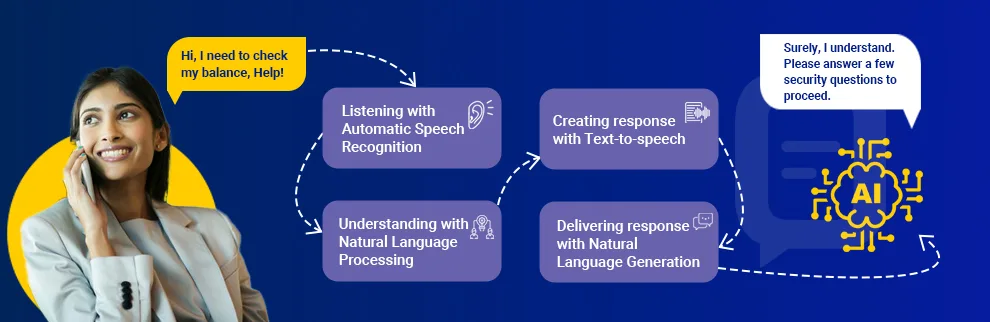
  1. Listening and Comprehending: Conversational IVRS accepts the call and listens to the customers while comprehending the input.

  2. Response Formation: Based on the input, the IVRS, using AI and NLP will formulate a response.

  3. Offering the Response: Using Natural Language Generation (NLG), the IVRS system will share the requisite information with the customers in a language they can understand. 

Benefits of Conversational IVRS for Customers and Organizations

A conversational IVRS engages customers in natural language conversations, sharing information they need without any significant delays. As a result, the customers are satisfied with the services and stay loyal to the company. 

  • Quick Resolutions: With access to a comprehensive knowledge base of product information and company policies the IVRS can answer maximum questions from customers increasing First Call Resolution (FCR) and improving the Net Promoter Score (NPS).

  • Automation of Routine Tasks: With programmable automation in IVRS, it’s easier to delegate routine tasks to the machine, while the human workforce focuses on innovation and growth.

  • Personalized Customer Support: Customers can ditch the complex menu selection and get personalized support through a conversational IVRS, increasing query resolution call rerouting to an expert.

  • Creates an Efficient Customer Service System: An NLP-based IVRS can quickly identify customer’s needs and provide personalized information, effectively reducing response time and increasing overall efficiency.

  • Saves Costs: By reducing the number of human resources required to handle customer queries, a conversational IVRS can reduce staffing costs. An IVRS shares the information customers need in one single call, reducing recurrent calls and saving company resources. 

Conversational IVRS in Action – Real-Life Use Cases

Several Indian companies are using a conversational IVR system to handle customer queries. Here are a few examples:

  • The popular airline wanted to make every traveler feel welcomed and well taken care of in their journey. Revamping their old IVR system, Delta Airlines brought in a conversational IVR system to provide personalized information and proactive alerts to the customers. As a result, the number of customers requesting a specialist increased by 10% and the system was able to capture caller intent for 75% of calls.

  • The popular Pizzeria brought in a conversational IVR system to improve over the earlier standard IVR. The new system is now available in Hindi and English leading to better convenience, making ordering over the phone easier, and streamlined customer experience.

  • eCommerce giant Integrated with local dialects, variations, and colloquial terms, Flipkart’s voice assistant is making it easier to buy groceries through the online platform. 

These examples showcase diverse applications of conversational IVRS across different industries. Conversational IVR systems have wide-ranging benefits on an organization’s capacity to improve customer experience. To achieve results, focus on the implementation part of an IVR system. 

Implementing Conversational IVRS | Practical Steps and Best Practices

For successful implementation, companies should adopt a strategic approach. In addition to the technical expertise required for setting up the system, you must also identify the existing technology trends in customer service for effective implementation.

  1. Set Your Objectives: Start by answering “What do we want to achieve”? The answer will influence the implementation process and technologies. Some of the common goals include reduced waiting times, increased self-service rates, and overall leading to better customer experience.

  2. Set the Conversational Flow: Map out the expected dialogue between customers and a live agent. Bring the same conversational aspects and tonality to the IVR system matching the appropriate responses. Explore multiple conversational paths and feed the data to the IVR system. To know the flow, check past call scripts to update the systems.

  3. Choose Conversational IVRS Vendor: To choose a conversational IVRS vendor evaluate all the available ones for their features, functions, pricing models, and integration options. Choose the one with on-demand scalability, NLP capabilities, easy integration, and higher security. Also, check vendor reputation, support services, and their portfolio.

  4. Data Preparation and IVRS Training: After choosing the vendor, prepare your data to train the system. Train the IVRS system with accurate and up-to-date information on the product and services. Include troubleshooting guides, knowledge base articles, product guides, and manuals. The content should be clear and tailored according to the conversational paths.
  5. Test and Refine: Testing is crucial to ensure optimal performance and build a flawless conversation-based IVRS. Check it with diverse user groups and problems to identify the issues and improve them before deployment. 

Best Practices to Implement and Deploy a Smart IVR System

  • Phased Deployment: Roll out the system in phases to minimize disruption enabling improvements and adjustment wherever required. Begin with simple tasks and gradually increase the system’s functionalities.

  • Clearly Share Agent Availability: Share the agent available with the customers when after-hours services are running. This is to avoid any friction and ensure seamless escalation of the issue along with sharing the estimated time with the customers.

  • Personalize the Interactions: Add personalized greetings to the conversation and wherever possible, personalize the interactions. Consider using the customer’s name and using their past purchase history to personalize the interactions. This will make the customers feel valued and heard and build trust. 

Future Trends and Innovations in Conversational IVRS

  • Customer Emotion and Sentiment Analysis: IVRS systems will be able to recognize the customer’s emotional state from their voice or text and tailor the support accordingly. 

  • Omnichannel Integration: In addition to entertaining customers through calls, IVR systems can also connect and coordinate with other channels like mobile, social media, chat, email, etc. 

To Sum it Up

A conversational IVRS is pivotal to building a customer-centric support system. With capabilities like personalization, artificial intelligence, and natural language processing, a smart IVRS can significantly improve customer service operations. 

Improve customer experience with Elision omnichannel contact center solution and be available across all channels. Stay connected with your customers to increase customer engagement and loyalty. Get in touch to book a demo

Loading

Elision Technologies Shines at Bharat BFSI Leadership Summit & Awards 2024.

Bharat BFSI Leadership Summit/Awards 2024

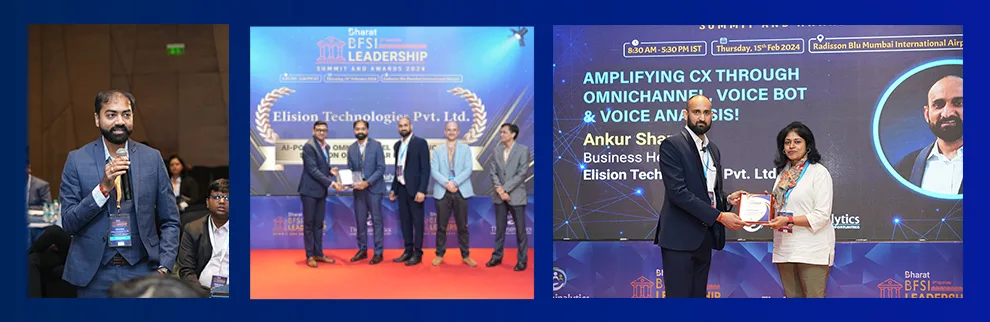
Elision Technologies, a leading provider of communication solutions impressed attendees at the Bharat BFSI Leadership Summit and Awards 2024 with their innovative AI- driven communication platforms that are revolutionizing debt collection strategies and improving customer experiences. Their next gen solutions & product demonstration at the summit, and winning the AI-Powered Omnichannel Communication Solution of the Year for Best CX award among esteemed BFSI leaders highlighted their leadership in the industry.

As Mehul Shah, CEO & MD of Elision Technologies graciously accepted the award he emphasized the company’s dedication to offering cutting edge solutions in the BFSI sector. By utilizing state of the art AI technology, team Elision aims to revolutionize customer interactions and customer experience at scale. Mr. Shah envisions a future where personalized communication driven by artificial intelligence will be pivotal, in reshaping the BFSI landscape.

AI-powered super agents have impressed many by effectively blending natural languages with specific purpose driven interactions, empowering collection agencies to manage intricate banking inquiries, identity verification processes, payment/ loan related questions and offering tailored experiences in various languages. These super agents not only boost efficiency and productivity but also deliver exceptional customer service around the clock.

Moreover, Elision’s AI-driven debt collection platform has been widely praised as a comprehensive platform in the industry. By leveraging machine learning algorithms this platform examines customer behaviors and their trends to enhance debt collection strategies. And it helps the Banking, Financial services and Insurance (BFSI) sector for increased recovery rates, better cost savings and a streamlined automated collection process.

During his keynote speech, Mr. Ankur Sharma, Business Head at Elision emphasized the importance of embracing omnichannel communication solution to enhance customer satisfaction and experience. Elision’s AI powered solution seamlessly merges communication channels such as voice calls, chats, emails, SMS,  and social media platforms to provide a unified and personalized experience for customers.

He also introduced an integrated AI-driven voice analysis platform that elevates service quality (QoS) and communication standards (QoC) without human involvement. This system offers insights like call analysis, emotion and sentiment assessments as well as verbose and silence analysis.

Additionally he highlighted the importance of communication advancements in the banking and finance sector emphasizing how utilizing voice bots and AI-driven super agents could transform customer interactions seamlessly.

Elision Technologies, with a client base of over 250+ BFSI esteemed organizations has played a pivotal role in helping companies achieve substantial productivity gains and notable improvements in their collection figures. Their innovative solutions have revolutionized operations for businesses in the BFSI sector enabling them to offer seamless customer experiences and enhance their overall success. Schedule Free Demo Today! ✨

Conclusion: Elision’s impressive performance at the Bharat BFSI Leadership Summit And Awards 2024 demonstrated their dedication to excellence and technological innovation. Through leveraging AI-powered communication platforms which empowers customer interactions, debt collection processes and helps banking and insurance companies to attain remarkable productivity and collection outcomes. The future of the BFSI industry hinges on embracing these transformative technologies, with Elision Technologies leading the charge.

Loading

100 Must Know Call Center Terminologies

100 Must Know Call Center Terminologies

The call center industry is growing and expanding like anything in the past few years. This has increased the awareness about call centers and software used to run seamless operations in this industry. A call center solution is usually used to handle communication and various other operations to efficiently run a call center or customer care center business. This software is available as a GUI based solution, still, there are multiple jargons associated with this system and industry. In this article, we are going to explore the top 100 call center terminologies.

We are going to cover all majorly used terminologies associated with a call center software solution and this industry to give a glossary or complete vocabulary. It will serve as your ultimate call center dictionary.

A

1. Agent

Call center agent is a commonly used word and therefore, this glossary starts with it. He is a representative of the call center that communicates directly with customers or prospective customers. Most of the time he is on the call and having conversations and in the remaining time, he would be completing administration jobs, dispositions, training, etc.

2. Abandoned Call

When a customer disconnects the call before an agent actually answers the call and greets the client, it is called an abandoned call. In both inbound and outbound centers, customers abandoned the call for various reasons such as the unavailability of an agent, too long waiting time, network issues, connection errors, etc. In outbound centers, the calls are often abandoned while predictive dialing is used.

3. After Call Work

Once the call is completed, an agent needs to take care of certain jobs such as putting disposition in the disposition box, making some entries in the CRM system, etc. All these jobs are called After call work (ACW).

4. Auxiliary Time

When an agent has logged into the dialer, but it is not attending calls, it is called auxiliary time. This time is often invested in attending training, meetings, taking breaks, etc.

5. Automatic Call Distributor (ACD)

It is one of the most commonly used call center terminologies and automation features available in contact center software. It automatically distributes incoming calls to appropriate agents. A single system can have more than one automatic call distributor rule.

6. Auto Dialer

It automatically dials the phone number from the lead list. It automated outbound calling campaigns. A system can have multiple auto dialers.

7. Automated Callback

The system automatically calls back the customer as per the requested time by pushing the number to the call center dialer hopper. It does not need agents to remember the time and make a callback. The scheduling will be 100% automatic.

8. Average Call Handling Time

It is the metric used to evaluate the average time agents take in a call center to handle a call. This time includes the complete time spent handling a single call from the client. This includes the time since the agent picks up the call to complete after call work. This includes talk time, hold time, and disposition job.

9. Average Call Answer Rate

It shows the ratio of the total number of calls answered by agents compared to the total number of calls received by a call center.

10. Average Talk Time

An agent manages various jobs during his shift, but his main job is to have conversations with clients or prospective customers. Thus, average talk time KPI (Key Performance Indicator) is used to measure how much actual time is spent by an agent talking to clients. To find this time spent in the queue, after call work, hold time, etc. gets subtracted, and only talk time is measured.

11. Average Call Drop Ratio

Customers are likely to hang up calls even while having a discussion or while in a conversation with an agent. This is called call dropping. An average call drop ratio identifies average clients that dropped calls before having a conclusion of the call. This can happen due to various reasons like network or technical issues, too long call hold time, lack of skills in agents, high irritation level in clients, and more.

12. Average Call Value

It is one of the call center terminologies that help in assigning monetary values and identifying revenue generation or profit making. The total revenue generated by the call center gets divided into a total number of calls attended. This comes up with a single value for each call, which is referred to as a call per value or average call value.

13. Average Hold Time (AHT)

This KPI identifies the average time spent by customers on hold and waiting for an agent to respond to their questions. The time spent in the call queue is also counted in the hold time. Moreover, the time customers spend on hold while agents look for the resolution is also considered in this KPI. Too high call hold time can lead to high dissatisfaction among clients.

14. Average Speed of Answer (ASA)

It shows the average time agents take in answering a call. Once the call is assigned to an agent, the agent takes some time to utter the first word of greeting. This is the time an agent took to answer a call. This speed is referred to as the speed of the answer.

15. Auto Attendant

As the name suggests, it automatically attends all incoming calls. It can play a greeting prompt and even put music on hold or assign a call queue to the caller to keep him engaged and connect with the right agent.

16. Automated Call Sequencer

This is an advanced feature available in a contact center solution. This feature can identify the average time it would take to connect with an agent based on the current call queue. This will be played during the call hold time to give a hint of how long the call hold time will be for a customer. Some call center solutions also give the option to schedule a callback.

17. Automatic Number Identification (ANI)

It defines the number of callers in real time and shows it to the agent. In simple words, it shows the caller ID to the agent in real time. This information can be used for call mapping to the right call center location or agent.

18. Application Programming Interface (API)

It is one of the most technical call center terminologies. It creates a bridge between two different software solutions. It defines a set of procedures, functionalities, and tools that characterizes how different components work in a harmony. The APIs also get used to adding some features of another software solution into the call center system.

19. Automatic Speech Recognition (ASR)

The ability of a machine to identify a word or phrase in a spoken language is called speech recognition. The whole process is automatic, which is why it is called automatic speech recognition. 

B

20. Business Continuity Plan

It is an important business document, which defines the major risks lurking in the business and can cause major or minor losses to the business. The business continuity plan also defines the best practices and standards that a call center must follow to continue running and growing without causing any negative impact on business.

21. Business Process Outsourcing (BPO)

When a company contracts a call center to process the operations to leverage outsourcing advantages, this is called business process outsourcing. A company that offers offshore business processing services is called a BPO.

22. Business Intelligence

This is one of the call center terminologies that have gone popular after the massive intervention of artificial intelligence in the call center industry. Business intelligence is a process of using data analytics tools to identify patterns in data to generate intelligent standards to run a business.

23. Blended calling campaigns

Usually, a call center either runs an inbound or outbound calling campaign. When it uses blended calling, the agent would receive both types of campaigns. This type of campaign is called a blended campaign. The agents that take blended calls are known as blended agents.

24. Base Staff

The staff that will be available during the working hours at minimum is called base staff for optimal operations. For example, if a call center has 100 agents and 80 are the base staff, then at any given time, there will be 80 agents operating in the call center. Even when some agents are absent, on break, or have not joined the shift, the base staff would be available and actively working.

25. Blended call center solution

A call center software solution that supports a blended calling mechanism along with or without inbound and outbound calling is called a blended call center solution.

26. Blocked Calls

When a call is blocked from reaching an agent, then it is called a blocked call. A call can get blocked for several reasons such as the trunk being filled, the queue limit being over, or other technical or system issues.

27. Busy Study

It is the number or detailed report sent by the carrier to the call center to show the percentage of calls that could not get connected for certain reasons such as the line or carrier being busy.

C

28. Call Routing

Routing a call means traversing a call to the right destination. In general, an inbound call gets routed. It can be routed to an extension, call queue, another IVR, voicemail, etc.

29. Callback

It is a process of calling back a customer that has requested to get connected at a certain point in time. The callback might be requested by the client during an outbound call to an agent. In this case, the agent would schedule a callback manually by adding details to the contact center software. Unlike that, it might be an automated callback scheduled by the dialer itself at the request of a customer waiting in the call queue.

30. Call Avoidance

When an agent intentionally avoids calls by putting off the IP Phone receiver or by using any other technology in the Softphone. This can hamper multiple KPIs as the customers cannot reach the agents.

31. Call Detail Reports (CDR)

This is a complete and basic report available in each call center dialer solution. It logs and represents details of each call in a tabular report format. This may include call start and end time, caller ID, type of call, customer details, call duration, and more. The CDR format may vary from one call center software provider to another.

32. Customer Relationship Management (CRM)

It is another crucial system used in call centers. The main objective of using a CRM system is to manage more detailed information about customers to enhance lead nurturing campaigns. Many contact center solutions allow integration of a CRM system or offer an inbuilt mini CRM system to let agents use the customer information during live calls to provide personalized customer information.

33. Computer Telephony Integration (CTI)

It is the process of connecting your telecommunication system with a business or call center database and using the telecommunication system via a computer.

34. Call Management System (CMS)

It is a complete system to manage different types, inbound, outbound, and blended, calls and track the performance in real time and historically.

35. Calibration 

This is an evolutionary process to map the accuracy of customer satisfaction goals of customers with the performance of the agent and the quality of service delivered to customers.

36. Call Center Software

It is a complete platform with an array of features that empowers call centers to function accurately and meet different business goals.

37. Cloud Call Center Solution

A call center dialer solution hosted on any of the cloud platforms is known as a cloud call center solution. It empowers the concept of work from home agents and remote call centers.

38. Call Controls

A system gives access to an array of CTI features to agents during a live call, which is referred to as call controls. Some of the common call controls available to agents during a live call are call mute and un-mute, call hold and retrieve, call transfer, hang up, and more.

39. Call Recording

It is another feature available in the software for call centers. It lets call centers record calls for quality assurance and training purposes. It saves the call recording files in the system or on the cloud, which can be later downloaded or played within the system for quality check.

40. Call Queues

When agents are occupied on other calls and not available to take the call, then the system puts the customer in the waiting line. This waiting line is called a call queue.

41. Call Forwarding

The system allows call centers to make configurations to forward a call dialed on a particular number or extension to another number of extensions. This process is called call forwarding.

42. Call Transfer

When an agent transfers an ongoing call to another agent or supervisor, this process is called call transfer. Call center dialer software supports attended and blind call transfers. In the attended transfer, the recipient agent or supervisor is informed that the call is getting transferred to him or her. In the blind transfer, the agent simply transfers the call without informing the other party.

43. Customer Satisfaction Rate (CSAT)

This is a vital KPI that measures how many customers are happy with the delivered service and satisfied with the given solution. Usually, it is defined based on the ratings collected from customers after the completion of an ongoing call.

D

44. Dashboard

It is the first screen for supervisors and admin, which shows the value of major metrics. It displays different performance indicators of agents, systems, call centers, etc. Different call center solutions can have different values on the dashboard.

45. Disposition

It is the process followed in the after call work by an agent. The agent indicates the conclusion or status of the call in disposition.

46. Direct Inward Dialing (DID)

It is a direct dial in number that connects the caller directly to the intended recipient without staying in the queue or dialing an extension.

47. Do not Call (DNC) list

It is a system wide or campaign wide list of phone numbers that indicate the numbers that need to be skipped during auto dialing. The customers might have opted for the DNC list and should not be contacted for a specific interval or permanently. 

E

48. Escalation Plan

It is a documented plan that defines how to handle an escalated call. Usually, when a call cannot be handled by an agent and needs to be escalated to the supervisor or the customer explicitly demands to talk to the supervisor, it is called an escalated call. The escalation plan defines the guidelines for both agents and supervisors to handle escalated calls professionally.

49. Expected Wait Time (EWT)

It is an average wait time a customer needs to hold on to get connected with the agent. It is calculated with the formula of dividing the value of the multiplication of position in the call queue by the average call handle time with the value of the total number of active agents.

F

50. First Call Resolution (FCR)

When a customer receives the resolution to their query within the first call, it is called first call resolution. If you are using an omnichannel contact center software solution, it is also referred to as a first contact resolution as any mode of communication may get used.

51. First Response Time (FRT)

It is a performance indicator that indicates how long a call center agent takes to first respond once the customer puts his concern or query forward for resolution.

G

52. Grade of Service

This metric defines the possibility of getting a call blocked because of a technical issue in the circuit or because it is busy.

H

53. Handled calls 

It is an individual and overall performance indicator, which calculates how many calls out of received calls are handled by the agents.

54. Healthcare call center

A call center that exclusively processes business operations and handles campaigns in the healthcare industry is called a healthcare call center.

55. Helpdesk 

When a call center is set up to manage technical support requests of clients, it is a help desk. A help desk call center solution will have added features to support managing technical requests and tickets.

56. HIPAA Compliant 

When a system or call center follows the policies defined by Health Insurance Portability and Accountability Act, it is called a HIPAA compliant system or call center. If you want to operate in the healthcare industry, it is a must to follow HIPAA compliance in order to protect the confidentiality and privacy of sensitive patient data.

57. Hit rate

The number of successful calls out of a total number of calls is called the hit rate of that agent or campaign.

58. Historic Reports

The tabular or graphical representation of major KPIs based on historic data is called historic reports. These reports are used for evaluation of performance in a specific time and to make the required business decisions.

I

59. Inbound call center

When a call center handles only incoming calls, it is referred to as an inbound call center.

60. Interactive Voice Response (IVR) System

It is one of the most traditional call center terminologies as it is associated with the most conventional features of the software for call centers. IVR is a system that lets the caller interact with a menu of voice prompts and take the required action or get a resolution to the query without actually getting connected to an agent. It is a self serving feature.
Read the full IVR explainer →

61. Idle Time

The time when an agent sits idle waiting for the next call or task and doing nothing is called idle time.

K

62. Key Performance Indicators (KPIs)

Each call center has some predefined performance metrics that get evaluated from time to time to measure the success and efficiency of operations and individuals. The major performance indicators monitored by a call center are referred to as key performance indicators.

63. Knowledge Base

A call center system includes a feature or module that provides instructions and guidelines to effectively manage customers and protocols, plus, efficiently using software, tools, etc. for agents and supervisors. It is called a knowledge base.

L

64. Level Zero Solvable

It signifies the number of calls that are resolved by the agent or a supervisor, but that could have been resolved by an IVR or an FAQ section on the website.

65. Lifetime Value

It indicates the revenue generated by a customer from the day he or she has become a paid customer till today.

66. Live Statistics

It shows the real time value of major performance indicators. The live statistics can show values related to the system, software, trunks, agents, campaigns, calls, etc. to let supervisors ensure everything is operating as per the predefined efficiency level.

67. Live Monitoring

A contact center system provides various features to let admin or supervisors monitor performance in real time such as live reports, live dashboards, barge-in feature, etc. When a supervisor monitors major performance indicators in real time, this process is referred to as live monitoring.

68. Load Balancing

Technically, it is the process of handling massive call volume that can bring the system down by adding an additional server, database, call queue, etc. In a call center, the excess call volume is swapped from agent call queues to supervisors to balance the peak hours and manage the load.

69. Longest Waiting Agent

It signifies the agent that has been waiting for the longest for the next call.

70. Longest Idle Agent

It indicates the agent that has been sitting idle and doing nothing for the longest.

M

71. Manual Dialer

A contact center system will have a phone alike dialpad feature that lets agents manually dial and connect a number to have a conversation. It is called a manual dialer and is used when the number is not stored in the lead list.

72. Multilingual call center software

When a system supports more than one language, it is called a multilingual call center software solution.

73. Multi currency support

When a call center has payment processing options from a business or technical perspective and it supports multiple currency types, it is a system that supports a multi currency supported platform.

74. Multi tenant call center solution 

A call center platform that supports tenant support is called a multi tenant call center solution. Using a single software solution, multiple software instances can be created and each of them can be used as an individual yet centrally controlled contact center solution

N

75. Net Promoter Score (NPS)

It is one of the vital performance indicators, which showcases the probability of getting promoted or referred to the network of an existing customer. The high NPS defines a high performing call center.

O

76. Occupancy Rate

It indicates the duration for which the agent was occupied in handling calls or doing after call work versus the time agent was logged in to the system.

77. Outbound call center

A call center that handles only outgoing calls is referred to as an outbound call center.

78. Omnichannel Call Center Solution

A solution for call centers that supports unified aka all communication channels within the software is called an omnichannel call center solution. The communication channels include voice calls, video calls, SMS, email, fax, social media, WhatsApp, help desk, and more.

P

79. Peak Hours

The hours of the day when a call center receives maximum call volume are called peak hours.

80. Predictive dialer

It is an auto dialer feature available in the software. It can predict the ratio of calls that need to be dialed to connect with a human vs. when the agent will complete the ongoing call. The predictive dialer is the most advanced auto dialing system.

81. Progressive dialer

It is another auto dialer that dials the phone numbers automatically from the lead list in a progressive manner.

82. Preview dialer

This auto dialer shows a preview of the lead to be contacted before the automated dialing of the phone number. The agent gets an opportunity to accept or skip the lead.

83. Platform as a Service (PaaS)

When a call center or business uses call center software as a platform and offers it to other businesses for revenue generation, this business model is called PaaS. The multi tenant call center solution is used to run the PaaS model.

Q

84. Quality of Service (QoS)

It indicates the rate of performance accuracy and services delivered by agents, systems, protocols, etc. to deliver an excellent customer experience with their services.

85. Quality of Call (QoC)

It defines the overall quality of each call, which is ideally defined by the efficiency of handling a call by an agent with a professional and polite conversation. 

R

86. Random Call Distribution

It is a type of automatic call distribution strategy available in the system to route calls to different agents or call queues. It randomly assigns incoming calls to different agents and queues.

87. Round Robin Call Routing

It is another automatic call distribution strategy, which assigns calls to agents or queues on a first in, first out basis aka in a sequence from queue 1 to queue N.

88. Real Time Reports

The modern call center solutions add an additional segment of reports, which update all major KPIs in real time to show live values of each KPI and take instant action to improve performance.

89. Remote Agent

When an agent adopts work from home or work from anywhere model with the help of a cloud contact center solution, it is called a remote agent.

90. Redial 

When an auto dialer cannot connect with the lead in the first attempt and it retries to connect with that lead by redialing the number, it is called redial.

91. Rest Day Overtime (RDOT)

When an agent works on a day off or holiday as overtime, it is referred to as rest day overtime. 

S

92. Script

It is an easy to scan, written document that gives instructions and guidelines to agents to handle and lead each conversation in an unformed and systematic manner.

93. Service Level Agreement (SLA)

It defines a legal document or agreement that entails the service provider meeting the predefined benchmark of service.

94. Skill based routing

It is an auto call distribution feature, which routes the incoming call of a client to the most skilled agent.

95. Sticky Agent

This auto call distribution feature routes an incoming call of a customer to the same agent every time. As it sticks to the same agent, it is called a sticky agent.

96. Software as a Service (SaaS)

When a call center dialer system is used to provide service to other call centers or businesses, this model is called SaaS. A multi tenant contact center solution is used to run the SaaS model.

T

97. Text to Speech Converter 

Some call center solutions support the conversion of written text into a voice prompt to use in an IVR or voice broadcasting. This feature is called text to speech converter.

U

98. Unified Communication System

The platform that supports the use of all popular communication channels within a single system is called a unified communication system. An omnichannel contact center solution is a unified communication system. 

V

99. Voicemail to email

Some contact center solutions support voicemails for agents. That means clients can leave a voicemail message, which is received by the agents and can be listened to. The voicemail to email feature sends the voicemail message to the email.

100. Voice analysis tool

This is available in an AI call center solution, which analyzes various factors of voice for quality assurance such as sentiments, the pace of voice, silence detection, etc. The voice values of both client and agent can be evaluated with this tool for performance evaluation.

IVR (Interactive Voice Response)

IVR stands for Interactive Voice Response — the automated phone menu that answers a call and routes it based on what the caller presses or says. It can also resolve simple requests (balance checks, OTPs, appointment confirmations) without a live agent.

Read the full IVR explainer →


Cloud Telephony

Cloud telephony is a business phone system that runs over the internet instead of physical lines or on-site hardware — the provider manages all infrastructure. Businesses use it to scale call capacity instantly, support remote agents, and avoid hardware investment.

Read the full Cloud Telephony explainer →


Predictive Dialer / Auto Dialer / Progressive Dialer

An auto dialer automatically places outbound calls from a list. A predictive dialer predicts agent availability and dials ahead for maximum volume. A progressive dialer only dials once an agent is free — prioritising compliance over call volume.

See the full dialer comparison →

Conclusion

These are the top 100 terminologies associated with the call center industry. Some of them might sound like jargon to you, but we have tried to make it simplified for you to understand each important phrase associated with the contact center. If you have any questions or want to share your thoughts, feel free to contact us.

What is the difference between a call center and a contact center?

 A call center handles voice calls only. A contact center handles voice, email, chat, WhatsApp, and social media — all from one platform with a unified customer history across every channel.


What does IVR stand for in a call center?

IVR stands for Interactive Voice Response — the automated system that greets callers, presents a menu, and routes them to the right agent or department without any manual intervention.


What is cloud telephony?

Cloud telephony is a phone system that runs over the internet with the provider managing all infrastructure — no physical lines or on-site hardware needed. Businesses can scale call capacity instantly and support remote agents from anywhere.

Loading

Key Trends Shaping Contact Center Efficiency: A Deep Dive into UI and UX Design Evolution!

DialShree_UI&UXTrends

Introduction

In the race to provide an omnichannel customer experience, brands empower their support centers with robust contact center solutions. Along with an eye on performance and user experience, they hyper-focus on efficiency. In the effort to improve efficiency, several aspects come into the picture, including technologies, communication tools, data analytics, AI, and more.

One aspect that plays an indispensable role in shaping the efficiency of contact centers is UI and UX design. The UI and UX is one of the most essential elements, not just for the customers but for the agents, too. As per stats, a company with an IT ticketing system with an interactive interface can boost agent efficiency by 15-20%.

Therefore, having a ticketing system or an omnichannel communication solution with excellent UI/UX features is indispensable. Let’s proceed with the blog and shed some more light on it.

Why do UI and UX Matter?

In a contact center environment, the agent’s productivity is paramount. As a call center agent has to take over 50 to 100 calls a day, they need tools that are easy to use. Besides, the admins of the contact centers also require the same tools for monitoring the agent’s performance, providing feedback, etc.

An easy-to-use tool should have some UI/UX elements, such as swift navigation, agent-friendly colors, auto-dialer, interactive dashboard, etc. These features help in faster operations like call switching, feedback recording, etc. Here are some more reasons to invest in the ultimate UI/UX.

Agent Perspective

  • Reduced Training Time
    Training is necessary whether it is a new employee or an old one interacting with a new software solution. With an intuitive UI, graphics, button placements, etc., it becomes easier for agents to locate what they need.

    A user-friendly interface featuring intuitive navigation and clear labeling reduces the learning curve. Thereby reducing training time. As per stats, an effective UI/UX design can help decrease training time by up to 50%.

  • Boost Agent Productivity
    Agent productivity is paramount in a contact center. An agent may have several tasks in a call center, such as fetching the issue ticket, dialing the number, talking to the agent, documenting the conversation, etc.

    If all these tasks are performed manually, they will hamper the productivity. Therefore, an automated dialer with features like auto-calling, voice-to-text conversion, etc., can be an awesome addition to its UX.

  • Improved Task Performance
    With all the necessary information on the screen, agents can find and use the required features on the go. For instance, if they need to add call information in the tool, it will be easier to locate a text box than a simple text somewhere on the screen.

    A well-designed UX includes exceptional information architecture that helps quickly locate the right feature.

  • Maintain Multi-Channel Consistency
    The omnichannel experience is not just for the users; it’s for the agents, too. With similar UI/UX features across all the communication channels, contact center efficiency can be jacked significantly.

    For example, an omnichannel communication solution with all the major communication channels with a single interface can boost the agent experience. As per the Tata CLIQ’s Director, “having a single interface for all kinds of CRM needs has made our agents happier and more efficient.”

  • Adaptability to Change
    No matter which software or tool it is, they are susceptible to issues with time. Therefore, they need to be updated as per the latest trends.

    A simplified UI/UX design is more straightforward to update and modify. Besides, it is a cakewalk to make the necessary updates and changes in the UI/UX without disrupting the customer and agent experience.

  • Amplifies Agent Experience
    Agent experience is all about how easy it is for the agent to use the tool or solution. Aspects like navigation, information architecture, visual design, typography, etc., the better they are, the better will be the experience.

    Stats show a 15-20% improvement in agent experience when there is a single interface for all CRMs.

Admin Perspective

  • Intuitive Navigation
    Besides agents, admins must also monitor several aspects to ensure business profitability. Therefore, the UI needs to have all the necessary tabs featuring tickets raised, CRM team performance, average agent earnings, etc., in proper size and font for quick navigation.
  • Visual Dashboard
    Several real-time contact center metrics need an admin’s attention at all times. These metrics include call volume, recurring calls, inbound calls, outbound calls, agent performance, and customer satisfaction.

    Colorful tabs highlighting these parameters can help them make data-driven decisions faster.

  • Customizable Reporting
    Reporting helps in understanding performance patterns and taking action. The tool UX should offer customized reporting to create and customize reports based on performance parameters.

    Collecting all the crucial parameters in one report enables admins to analyze contact center performance, identify trends, and measure KPIs.

  • Real-time Monitoring
    Real-time monitoring can help in handling emergency scenarios easily. Moreover, real-time tracking of parameters like agent activities, ongoing calls, and queues helps assess bottlenecks and take action immediately. All this is possible via an interactive UI/UX.
  • Collaboration Tools
    Training the agents can be seamlessly done with collaboration tools. With a supreme UI featuring collaboration tools like internal messaging tools, call monitoring and barging tools, etc., admins can seamlessly support their team members, improving productivity and customer service quality.
  • Responsive Design
    Unlike agents, admins need to have continuous access to the admin dashboard for a longer time. Hence, the UI/UX should be responsive, making it accessible not only on a PC or laptop but also on handy devices like phones and tablets.
  • Role-based Access Control
    Security and privacy is a primary concern for a contact center as there is a lot of sensitive data involved. Therefore, the UI/UX features should include role-based access defining permissions for each member of the company hierarchy.

What are the Key UI/UX trends in Shaping Contact Center Efficiency?

Every tool needs to be updated with the fresh industry trends. The same is the case with the UI/UX of the software. So, here are some key UI/UX trends that are Shaping Contact Center Efficiency.

  • Intuitive Navigation
    As businesses integrate multiple communication platforms into one software solution, intuitive navigation is necessary. In an omnichannel platform, all the required communication channels, such as SMS, WhatsApp, email, etc., should be placed exceptionally on a single screen or at least a few clicks away.

    This can help save navigation time and boost efficiency.

  • Chatbots
    Agent productivity is highly dependent on the relevant calls they take. For example, if a person is just calling to confirm their product’s renewal, it can be directed to the chatbot as it is a simple task that may not require an agent intervention.

    As 69% of the customers prefer to use a chatbot as it provides instant responses, it can also be a great promoter of agent experience. With chatbots as part of the contact center solutions, you can significantly boost efficiency as agents focus on more important tasks.

  • Agent-Centric Design
    The UI design should be entirely agent-centric. All required functionalities should be placed on a single screen, such as call transfer, manual dial, WhatsApp messaging, general messaging, Facebook posts, connected calls, internal chat, not-connected calls, etc.It will allow the agents to navigate and take action faster.
  • Customization
    Customizable UI is another UI/UX trend that is super useful in boosting agent efficiency. Agents can customize their user interfaces to move some of the screen elements to another place on the screen for quicker access.

    For example, agents can move elements to see previous and current customer interactions.

  • Clear Information Presentation
    The agent’s productivity is directly proportional to the efficiency of the contact center. The call handling can be swift and smooth if the agent is presented with all the necessary information about the customer, such as the name, number, previous interaction, call scripts, etc.
  • Gamification elements
    Gamification can be introduced in the call center solution in several ways. For example, you can monitor agents’ call parameters like issues resolved on calls, number of calls, missed calls, first call resolution rates, hold times, etc.

    Based on the analysis of these aspects, you can provide agents with star ratings, create leaderboards, provide badges, and more in the tool itself. This will gamify the calling tool and motivate the agents to perform better.

  • Streamlined Workflows
    To maintain a streamlined workflow means to keep the contact center tool as simple yet functional as possible. Make sure that all the chat and call features are placed at the right place on the screen.

    For example, divert all the basic customer issues to chatbots. Besides, keep the dialer application on auto-dial, provide interactive pop-ups for inbound calls, etc. All these can help establish a streamlined workflow.

  • Real-Time Data
    Real-time data access is an exceptional and innovative UX trend. It is combined with AI-backed data analytics that helps contact center admins get valuable insights about agent and contact center performance.

    With access to current and past data, they can picture the performance of every agent on a single dashboard.

  • Integration Capabilities
    As the call center may need multiple software like CRM, analytics, etc., side by side, software integrations are the best way to use them. Current contact center trends show that contact center solutions support these integrations.

    You can easily integrate third-party integrations into the solution to extend its usability. DialShree supports integrations like CRMs, IP PBX, EPBX, and other third-party APIs.

  • User Feedback Mechanism
    A user feedback mechanism is an excellent way to improve the contact center solution further. With the ability to add their feedback and suggestions regarding the solution’s performance, agents can play their part in the efficiency amplification.
  • Training and Onboarding Support
    Every Contact Center solution will have different UI and UX features, which could be easier to grasp quickly for a newbie. Therefore, it is necessary to include in-software training material that could guide the trainees to get used to it faster.

    For older employees, it can make the transition smoother.

  • Multilingual Support
    Multilingual support can be useful for contact centers with employees speaking other languages. In some contact centers, businesses hire people speaking another language to enhance the customer experience. For example, a business operating a contact center in the US would definitely have employees speaking Spanish.

    For those employees, multilingual support can be a blessing.

  • Error Handling and Notifications
    To ensure that your software does not affect the efficiency of your contact center, embed features like auto-flashing of error and warning messages on the screen with counteracting measures recommendations.

    It will help in taking action faster.

  • AI Driven Monitoring and Supervision
    Agent monitoring and supervision in a contact center has gone beyond call recording. Today, contact centers have implemented speech analysis to analyze customer and agent sentiments besides recording calls.

    Besides, agent monitoring and AI driven voice analysis can also help ensure compliance and identify upselling opportunities.

  • Mobile-Friendly
    A mobile application can be an awesome way for an agent to take an emergency call from anywhere globally. However, ensure the contact center applications’ UI/UX features are responsive and functional.

Provide Your Customers With the Best Contact Center Efficiency

Digital transformation across the communication sector has led to the disruption of these key trends. Today, it has become essential for contact centers to opt for solutions that have features aligning with these trends, or they may not keep up with the competition.

If you seek to challenge your competitors with supreme efficiency in your business contact center, opt for Elision contact center solutions. Their Omnichannel Contact Center Solution, DialShree, is ready to launch its version 2.0. This integrated solution houses all the latest features required in a call center solution.

To Know more about DialShree, book a free demo now!

Loading

Elision Attained Prestigious VNO License From DOT

Elision-Attained-Prestigious-VNO-License-From-DOT-

The Ahmedabad-based unified telecommunication solution provider Elision has been helping brands enhance their customer experience as per their business needs since its inception. Backed by their years of hard work and dedication, they have recently added a new entity to their business by attaining the prestigious VNO License from the Department of Telecommunications.

A VNO license is one that allows an entity to cater telecom services to the people without establishing the required telecom infrastructure. As the license is of several types, it is tough to attain. With this prestigious license, Elision has chiseled its name in the top 5% of players in the industry.

In light of the brand’s achievement, the CEO and MD, Mehul Shah, shared his views, “This Elision VNO license is a milestone in our mission of telecom business expansion and Telecom industry recognition. With the DOT license approval, we have established a new entity, Elision Telecom Pvt. Limited. I consider this as a big win for us as we can now empower our clients and partners to meet all their network and telecommunication requirements.”

He further added, “The license will enable us to handle seamless and affordable services. Moreover, we can cater to our clients with powerful solutions that can help them establish communication with their clients from anywhere. So, we do not just assist our clients but their clients too”.

Talking about the technicalities of the license. He said, “We believe in the ‘Make in India‘ vision, and this license serves as a significant promoter for our commitment to creating a 100% compliant telecommunication environment.”

The best thing is that the company’s profile will be amplified, establishing trustful relationships with its clients.

To put it concisely, the license will benefit Elision client’s and partners in several ways, such as

Cost Savings: Our services help our clients and partners save money by reducing telecom expenses.
Tailored Solutions: We customize our services to meet needs covering voice, data and other value added services.
Wider Coverage: Our services extend to areas ensuring comprehensive coverage.
Reliability & Flexibility: We offer services that can adapt to your business growth providing an user experience.
Strategic Alliances: We create value through bundled offerings, cross promotions and value added packages.
Regulatory Compliance: We prioritize data security, customer privacy and lawful interception to ensure compliance.
Exceptional Support: Our priority is providing customer support and assistance whenever you need it.
Quality Assurance: With access, to high quality network infrastructure we deliver an user experience.
Global Reach: Enjoy connectivity options with our network reach.
Innovation Hub: Explore the telecom technologies in our innovation hub.

About Elision

Elision is a reputed name in the landscape of businesses offering unified telecom solutions to corporates and enterprises. Our trail-blazing products and solutions, such as Dial Shree, Helpdesk ticketing system, WhatsApp integration, Greeter, IP PBX, etc., are surefire to serve your customers both domestically and internationally.

With the newly obtained VNO license, we can further transform our solutions and services to their clients by making cloud telephony solutions more affordable and compliant. Our solution, DialShree, is also ready for a 2.0 upgrade which will further make the telecommunication solutions better.

If you are seeking customer support solutions and assistance, you can book a free demo with us. You can know more about us on our website! Let’s Connect!

Loading

Happy CX, Happy Holidays – Diwali; A Celebration of Unity, Devotion and Festivity

Happy Diwali

It’s the week leading up to Diwali, and we are getting closer to the Festival of Lights. Diwali is a celebration that brings together people, from religious backgrounds in India. It is a time when hearts are illuminated with happiness, unity and devotion. Diwali transcends boundaries. Weaves a tapestry of light and festivity that unites millions.

The Significance of Diwali, It holds reasons for celebration. Its core message remains consistent across regions and communities. The festival encompasses the following aspects;

The Triumph of Light Over Darkness Diwali represents the victory of light over darkness symbolizing the triumph of good, over evil. During this festival homes and streets are adorned with oil lamps called diyas to dispel shadows and embrace righteousness.

Worshiping Goddess Lakshmi: Diwali provides an opportunity to seek blessings from Goddess Lakshmi, the deity associated with wealth and prosperity. Rituals and prayers are performed to invoke her grace for a year.

Lord Rama’s Homecoming: In parts of India, Diwali commemorates Lord Rama’s return to Ayodhya after vanquishing the demon king Ravana. The tradition of lighting diyas symbolizes the path of righteousness that leads to triumph.

Fresh Beginnings: In regions Diwali marks the commencement of a year according to the Hindu lunar calendar. People embrace this occasion by donning attire exchanging presents and adorning their homes as a representation of starting Diwali exemplifies the beauty of diversity and unity.

It is embraced by individuals, from faiths and backgrounds. India’s vibrant cultural mosaic showcases how this festival brings everyone together irrespective of their beliefs!

People belonging to faiths gather in unison to celebrate Diwali. The festival transcends boundaries. Transforms into a celebration of culture. Educational institutions and workplaces organize Diwali festivities where students and employees from all faiths partake in the merriment. Diwali encourages sharing and caring. Neighbors and friends exchange sweets and gifts to strengthen their bonds regardless of their affiliations.

Diwali is not a festival that illuminates only homes but warms the hearts of millions across India. It is an occasion that embodies unity, devotion and celebration. Diwali unites people in a display of illumination vibrant hues and happiness. It serves as a reminder that in India’s tapestry of diverse cultures festivals, like Diwali weave us together in harmony and joy. This Diwali let us commemorate the spirit of unity, devotion and merriment while sharing the warmth of love and joy like the gleam emanating, from countless diyas.

Loading

Unlocking the Future of Customer Experience, with AI; Elision & GITEX 2023 Trends

Unlocking the Future of Customer Experience, with AI

In a world where providing customer experience (CX) is paramount, businesses are turning to Artificial Intelligence (AI) to transform their approach. The upcoming GITEX 2023 promises to be a game-changing event with AI playing a role in revolutionizing CX. Join us as we delve into the trends and innovations that will reshape the CX landscape.

Our main focus will be on an omnichannel contact center solution that seamlessly integrates chatbots, the clock bot assistance that feels human-like, IVRS, speech recognition on-call support, Twitter and Facebook integration webforms, FCR (First Call Resolution) AI-driven voice analysis platform for effortless training programs.

The Evolving Power of AI, in Enhancing Customer Experience;

Witness firsthand how AI is transforming CX at GITEX 2023. AI technologies are not just improving CX; they are redefining it entirely. Become part of the future of customer experience.

Chatbots, Going Beyond the Basics:

Chatbots for Experience:

These advanced chatbots powered by AI go beyond automation; they engage in conversations that feel human-like while providing clock assistance and ensuring a seamless customer experience.

IVRS and Speech Recognition:

Experience the impact of IVRS and speech recognition powered by intelligence (AI) on self-service options. GITEX 2023 presents cutting-edge technology that enhances the speed and user-friendliness of self-service.

On-Call Assistance; The Perfect Blend of Human Touch and AI Advancement:

Witness the synergy, between AI-driven on-call assistance and human interaction. An innovative system around a knowledge base ensures that customers always receive a helping hand combining the touch with the efficiency of AI.

Twitter and Facebook Signals:

Discover how social media could be a game changer for your business considering the majority of your customers spend time over social media for various key interests hence listening to them via their preferred channel could get them a better cumulative experience, and also could save hundreds of hours for them 

Delve into the world of AI-powered web forms showcased at GITEX 2023. These web forms revolutionize data collection processes while prioritizing user centricity making customer onboarding more efficient than before.

Reimagining First Call Resolution (FCR) with AI:

Elision redefines first call resolution by harnessing the potential of AI technologies. Real-time insights empower agents to swiftly resolve issues during interactions significantly boosting customer satisfaction and loyalty.

AI-Driven Voice Analysis for Enhanced Call Insights:

Explore state-of-the-art voice analysis tools driven by AI at GITEX 2023. These advanced tools transcend transcription capabilities to identify emotions and evaluate agent performance providing data, for training purposes and continuous improvement initiatives.

Call Transcripts & Call Analysis:

Uncover the advantages of AI-optimized call transcripts, in nurturing agent skills. GITEX Global 2023 showcases how these transcripts can serve as a training resource to enhance customer service excellence.

Omnichannel Contact Center Solution:

Embark on a journey into the future of customer experience (CX) with an omnichannel contact center solution that seamlessly integrates AI-powered tools and channels within a platform. Elision presents an ecosystem that offers an exceptional customer journey.

Elision at GITEX Global Dubai 2023

GITEX (Gulf Information Technology Exhibition) 2023 is a massive event happening in Dubai. With AI as its primary theme, the event will host over 14 tracks of exhibition related to several modern-day industries like Cybersecurity, Data Economy, Digital Cities X AI, Edtech, Energy, etc.

Along with GITEX 2023 AI trends, there will be other trends, such as 5G Technology, Blockchain Technology, Cybersecurity Solutions, and Sustainability and Green Tech.

Over 3,500 AI startups and enterprises, along with Elision, will participate and feature 500 hours of AI debate.

GITEX Dubai Dates are 16-20 October 2023.

So, it’s time to fly to Dubai!

Meet us GITEX Global!

Loading

Contact Us

Our experts can resolve your customer engagement issues

Book a free consultation with our expert and see why more than 25000 users across 50 countries trust Elision for their communication needs.
Contact Us